

Network Scans: The Foundation of Modern Cybersecurity Visibility
Introduction to Network Scans
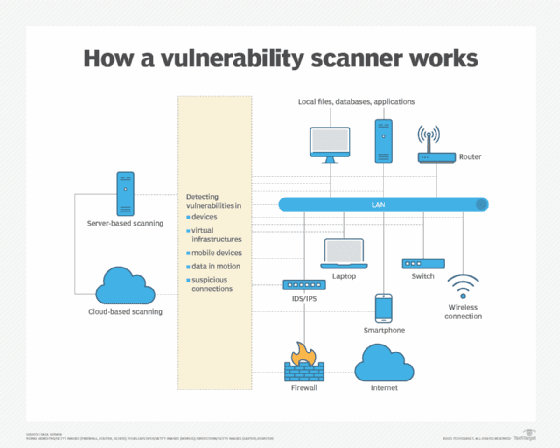
Network scanning is one of the most fundamental and powerful tools in an engineer’s arsenal. Whether you're an MSP, MSSP, Sales Engineer, SOC analyst, architect, or security practitioner, the ability to discover, enumerate, and assess assets on a network is essential. Network scans provide the visibility required to secure, maintain, and optimize environments — because you cannot defend what you cannot see.
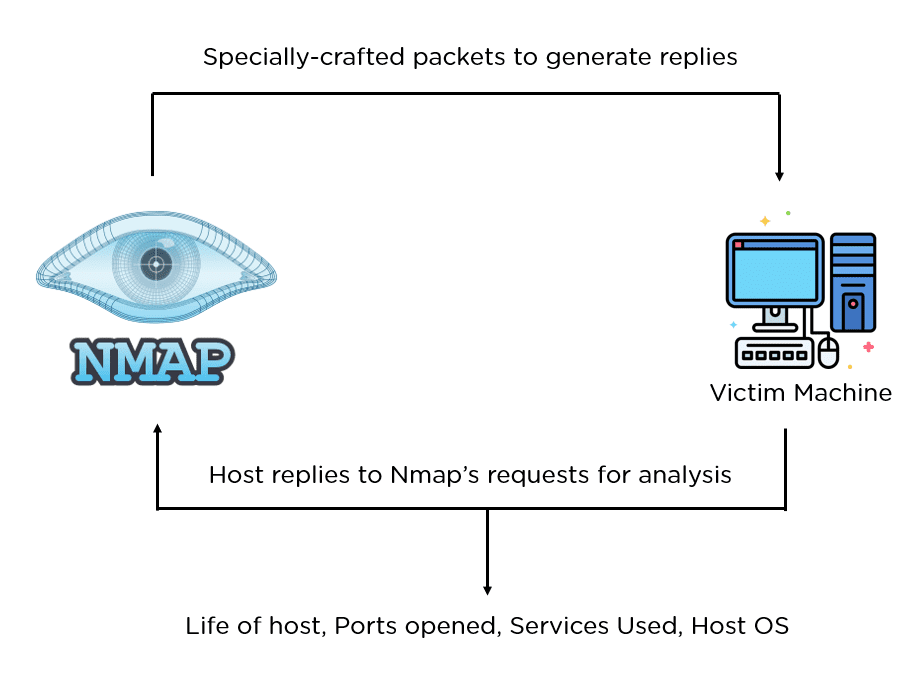
A network scan systematically probes hosts, devices, and services to identify:
- Active systems
- Open ports and exposed services
- Operating systems and fingerprints
- Application versions
- Misconfigurations
- Vulnerabilities
- Security gaps and attack vectors
From routine health checks to compliance assessments, network scanning plays a central role in understanding an environment’s true state.
Why Network Scanning Matters
Network scans fall into several categories, each serving a specific purpose.
Types of Network Scans
1. Host Discovery (Ping Sweeps)
Identifies which systems are active or reachable on a network.
Common methods:
- ICMP Echo
- TCP SYN to common ports
- ARP scans (ideal for LANs)
Tools: Nmap, Angry IP Scanner, Masscan, SolarWinds, RMM agents
2. Port Scanning
Determines which ports are open, closed, or filtered on a host.
Scan types include:
- TCP SYN Scan (most common, stealthy)
- TCP Connect Scan
- UDP Scan
- ACK Scan
- FIN/XMAS/NULL Scans (firewall evasion)
Use cases: firewall reviews, exposure assessments, service discovery
Tools: Nmap, Masscan, Zenmap
3. Service Enumeration & Fingerprinting
Goes beyond open ports to determine what is actually running:
- Service banner identification
- Application version detection
- OS fingerprinting
- TLS/SSL cipher enumeration
Critical for: patching, vulnerability assessments, identifying legacy services
Tools: Nmap, Netcat, Nessus, OpenVAS
4. Vulnerability Scanning
Evaluates discovered services against known CVEs, misconfigurations, and exposures.
Examples:
- Missing patches
- Weak SSL configurations
- SMB vulnerabilities
- Misconfigured web services
Tools: Nessus, OpenVAS, Qualys, Rapid7 InsightVM
5. Credentialed Scanning
Logs into systems with authorized credentials to gather deeper, accurate insights.
Benefits:
- Detects missing patches
- Reviews local configurations
- Enumerates installed software
- Identifies weak permissions
Tools: Nessus, Qualys, Microsoft Defender
6. External Perimeter Scanning
Simulates what attackers see from the internet.
Use cases:
- Attack surface assessments
- Shadow IT discovery
- External exposure validation
Tools: Nmap, Shodan, Censys, Rumble, Tenable ASM
7. Internal Lateral Movement Scanning
Used in Zero Trust and security assessments.
Identifies:
- Flat networks
- Open SMB/RDP
- High-risk lateral movement paths
- Unknown internal services
Tools: Nmap, BloodHound (AD mapping), Rumble
Common Tools Used in Network Scanning
| Tool | Purpose | Notes |
|---|---|---|
| Nmap | Host, port, service, OS detection | Gold standard; extremely flexible |
| Masscan | Ultra-fast internet-scale scanning | Millions of packets/sec |
| Nessus | Vulnerability scanning | Used by most MSSPs |
| OpenVAS | Open-source vuln scanner | Good alternative to Nessus |
| Qualys | Enterprise scanning / compliance | Cloud-based |
| Shodan | Global internet exposure research | “Search engine for devices” |
| Rumble/RunZero | Modern asset discovery | Very strong fingerprinting |
| Angry IP Scanner | Simple discovery | Windows-friendly |
Commonly Scanned Ports
| Port | Protocol | Service | Notes | Risk Level | MITRE Technique |
|---|---|---|---|---|---|
| 22 | TCP | SSH | Admin access, brute-force target | High | T1021.004: SSH |
| 23 | TCP | Telnet | Legacy, cleartext auth | Critical | T1040, T1021 |
| 21 | TCP | FTP | Unencrypted file transfer | Critical | T1048: Exfiltration |
| 53 | UDP/TCP | DNS | Lookup & enumeration | High | T1569.002 |
| 80 | TCP | HTTP | Web servers | High | T1190: Exploit Public-Facing App |
| 443 | TCP | HTTPS | Secure web | High | T1190 |
| 445 | TCP | SMB | Major ransomware vector | Critical | T1021.002 |
| 3389 | TCP | RDP | Remote desktop; brute-force | Critical | T1021.001 |
| 3306 | TCP | MySQL | DB exposure risk | High | T1078: Valid Accounts |
| 5432 | TCP | PostgreSQL | DB exposure | High | T1078 |
| 27017 | TCP | MongoDB | No auth defaults | Critical | T1190 |
| 5060 | UDP | SIP | VoIP attacks | Medium | T1040 |
| 8000-9000 | TCP | App Servers | Dev/test apps | Medium | T1190 |
Mitre Enrichment for Scans
| MITRE ID | Technique Name | Description |
|---|---|---|
| T1046 | Network Service Scanning | Used to discover services on remote systems |
| T1595 | Active Scanning | Reconnaissance and vulnerability discovery |
| T1021 | Remote Services | Pivoting and lateral movement using RDP/SSH/SMB |
| T1018 | Remote System Discovery | Finding hosts inside a network |
| T1190 | Exploit Public-Facing Application | Web exploitation via open ports |
| T1078 | Valid Accounts | Compromise of credentials to access DB ports |
| T1040 | Network Sniffing | Cleartext protocols such as Telnet/FTP |
Scan Types
| Scan Type | Method | Example Command | Purpose | MITRE Technique |
|---|---|---|---|---|
| Host Discovery | ICMP Echo Sweep | Nmap -sn | Detects live hosts | T1018: Remote System Discovery |
| Host Discovery | ARP Scan | Nmap --arp | Local network device discovery | T1016: System Network Configuration Discovery |
| Port Scan | TCP SYN Scan | Nmap -sS | Stealth scan for open ports | T1046: Network Service Scanning |
| Port Scan | TCP Connect Scan | Nmap -sT | Full connection scan | T1046 |
| Port Scan | UDP Scan | Nmap -sU | Detects UDP services | T1046 |
| Service Enumeration | Version Detection | Nmap -sV | Identifies service versions | T1592: Gather Victim Host Information |
| OS Detection | TCP/IP Fingerprint | Nmap -O | OS identification | T1033: System Owner/User Discovery |
| Vulnerability Scan | Nessus Scan | Nessus Default | CVE & misconfiguration scanning | T1069: Permission Group Discovery |
| External Scan | Perimeter Scan | Nmap / Masscan | Internet-facing exposure | T1595: Active Scanning |
| Internal Scan | Lateral Movement Mapping | Nmap / Rumble | Identifies open paths & protocols | T1021: Remote Services |
Scan Variances
| Scan Type | Strengths | Weakness | Risks | Best Use Case |
|---|---|---|---|---|
| TCP SYN Scan | Fast, stealthy | Only open ports detected | Low accuracy on filtered ports | Use on firewalled networks |
| TCP Connect Scan | Reliable | Slower; full connection | Noisy; logged | Use when SYN scan blocked |
| UDP Scan | Finds UDP services | Slow & unreliable | High false positives | Use targeted, not wide |
| Version Scan | Identifies services | More intrusive | Triggers IDS/IPS | Use internally |
| OS Detection | Fingerprint OS | May be inaccurate | Can be blocked | Use for mapping |
| External Scan | Internet exposure | Limited visibility | Cloud firewalls hide ports | Use for perimeter testing |