

Everything You Need to Know About DNS Records
DNS (Domain Name System) is the invisible backbone of the internet — the system that turns human-friendly domain names into machine-friendly IP addresses. Every time a user visits a website, sends an email, or connects to an online service, DNS records quietly determine where that traffic goes. For Sales Engineers, cybersecurity professionals, and anyone managing digital infrastructure, a solid understanding of DNS records is essential.
This guide walks through what DNS records are, why they matter, and the purpose of every major record type used today.
What Are DNS Records?
DNS records are instructions stored in authoritative DNS servers that tell the internet how to route traffic for a domain.
Each record has a type, a name, a value, a TTL (Time to Live), and sometimes priority or additional parameters.
Think of DNS as the phone book of the internet — but dynamic, globally distributed, and security-sensitive. The right DNS configuration ensures:
- Use redundant authoritative DNS (at least 2 servers)
- Enable DNSSEC if supported
- Implement SPF, DKIM, and DMARC for email protection
- Use CAA records to limit SSL issuance
- Monitor DNS changes with alerts
- Document DNS architecture as part of your network design
- Use short TTL during migrations or DR testing
Final Summary
- Troubleshoot faster
- Secure your domain
- Improve performance
- Enable modern cloud architectures
- Communicate effectively as a Sales Engineer or architect
Whether you're configuring a new website, protecting email flows, or building out a customer solution, mastery of DNS records is essential.
- Supporting modern IPv6 networks
- Reducing NAT overhead, improving routing efficiency
3. CNAME Record (Canonical Name Record)
Points one domain to another domain name instead of an IP address.
Example:
www.example.com → example.com
Use cases:
- CDN routing (Cloudflare, AWS CloudFront)
- Service-based subdomains (login.example.com → auth.service.com)
- Simplifies IP changes — update one A record, not dozens of hostnames
4. MX Record (Mail Exchange Record)
Routes email to the correct mail server(s).
Includes priority — lower number = higher priority.
Example:
Priority 10 → mail.example.com
Use cases:
- Office365 / Google Workspace setup
- Email failover
- Anti-spam routing
5. TXT Record (Text Record)
Holds arbitrary text data. Used extensively for security and verification.
Most common uses:
- SPF (Sender Policy Framework)
Defines which mail servers are allowed to send mail for your domain.
Example:
v=spf1 include:spf.protection.outlook.com -all - DKIM (DomainKeys Identified Mail)
Stores public keys used for email signing. - DMARC
Email authentication + reporting + anti-spoofing. - Domain ownership verification
Used by Google, Microsoft, Cloudflare, AWS, etc.
TXT records are arguably the most security-critical DNS records today.
6. NS Record (Name Server Record)
Specifies which name servers are authoritative for the domain.
Example:
ns1.yourdnsprovider.com
Use cases:
- Delegating DNS hosting
- Splitting zones
- Setting child-zone nameservers
7. SOA Record (Start of Authority)
The first record in any zone file.
Defines:
- Primary nameserver
- Contact email
- Serial number
- Zone transfer settings
- Refresh / retry / expire intervals
Critical for DNS replication and secondary DNS synchronization.
8. PTR Record (Pointer Record / Reverse DNS)
Maps an IP address back to a domain name.
Used primarily in:
- Email reputation systems
- Logging
- Anti-spam systems
- Carrier/ISP reverse lookups
Example:
192.168.1.10 → mail.example.com
Reverse DNS lives in a separate DNS zone managed by whoever owns the IP block (ISP, AWS, Azure, etc.).
9. SRV Record (Service Record)
Specifies host, port, and protocol for specific services.
Use cases:
- Microsoft 365 Autodiscover
- SIP / VoIP
- Kubernetes discovery
- LDAP / Kerberos in Active Directory environments
Example:
_sip._tcp.example.com → 10 5 5060 sipserver.example.com
10. CAA Record (Certificate Authority Authorization)
Controls which Certificate Authorities can issue SSL certificates for your domain.
Example:
example.com → issue "letsencrypt.org"
Great for preventing unauthorized SSL certificate issuance (anti-phishing control).
11. ALIAS / ANAME Record
Not a true DNS RFC record but widely supported by providers.
Allows root domains (example.com) to point to a hostname even though CNAMEs are not allowed at the apex.
Useful for:
- AWS CloudFront
- Managed hosting
- Load balancers
- Failover systems
12. DNSSEC Records (RRSIG, DS, DNSKEY, NSEC, NSEC3)
Used for cryptographic signing of DNS data to prevent spoofing, MITM attacks, and cache poisoning.
You don’t need to memorize every type, but know what they accomplish:
- Validates authenticity of DNS responses
- Protects against forged or tampered DNS data
- Adds a chain of trust from root → TLD → domain
More advanced, but increasingly important.
How DNS Resolution Works (In Simple Terms)
How DNS Resolution Works
-
- User types
example.com - Browser asks the recursive resolver (your ISP, Cloudflare, Google 8.8.8.8, etc.)
- Resolver checks cache
- If unknown, resolver asks:
- Root nameservers
- TLD nameservers (.com)
- Authoritative nameserver (your DNS host)
- Authoritative server replies with the correct record
- Browser connects to the IP returned
Optimizing DNS = improving resolution times + accuracy + reliability.
- User types
DNS TTL Explained
TTL (Time to Live) defines how long a resolver should cache the record.
- 300 seconds (5 min) = standard for dynamic systems
- 3600 seconds (1 hr) = common default
- 86400 seconds (24 hr) = stable static records
When preparing migrations, lower the TTL first, wait for propagation, then make changes.
- Validates authenticity of DNS responses
- Protects against forged or tampered DNS data
- Adds a chain of trust from root → TLD → domain
More advanced, but increasingly important.
Common DNS Mistakes to Avoid
- Using CNAME where A/AAAA is required
- Forgetting to update SPF after changing mail providers
- Missing DKIM = high spam score
- MX pointing to a CNAME (not allowed by RFC)
- Conflicting records for same hostname (A + CNAME)
- Incorrect DMARC policy configuration
- Setting TTL too high before changes
- Setting TTL too low on stable records (increases resolver load)
DNS Best Practices for Modern Infrastructure
- Use redundant authoritative DNS (at least 2 servers)
- Enable DNSSEC if supported
- Implement SPF, DKIM, and DMARC for email protection
- Use CAA records to limit SSL issuance
- Monitor DNS changes with alerts
- Document DNS architecture as part of your network design
- Use short TTL during migrations or DR testing
Final Summary
- Troubleshoot faster
- Secure your domain
- Improve performance
- Enable modern cloud architectures
- Communicate effectively as a Sales Engineer or architect
Whether you're configuring a new website, protecting email flows, or building out a customer solution, mastery of DNS records is essential.
- Your website loads quickly
- Emails deliver correctly
- Subdomains route to the right services
- Security policies like SPF/DMARC protect your domain
- Redundancy and failover work properly
Core DNS Record Types & Their Purpose
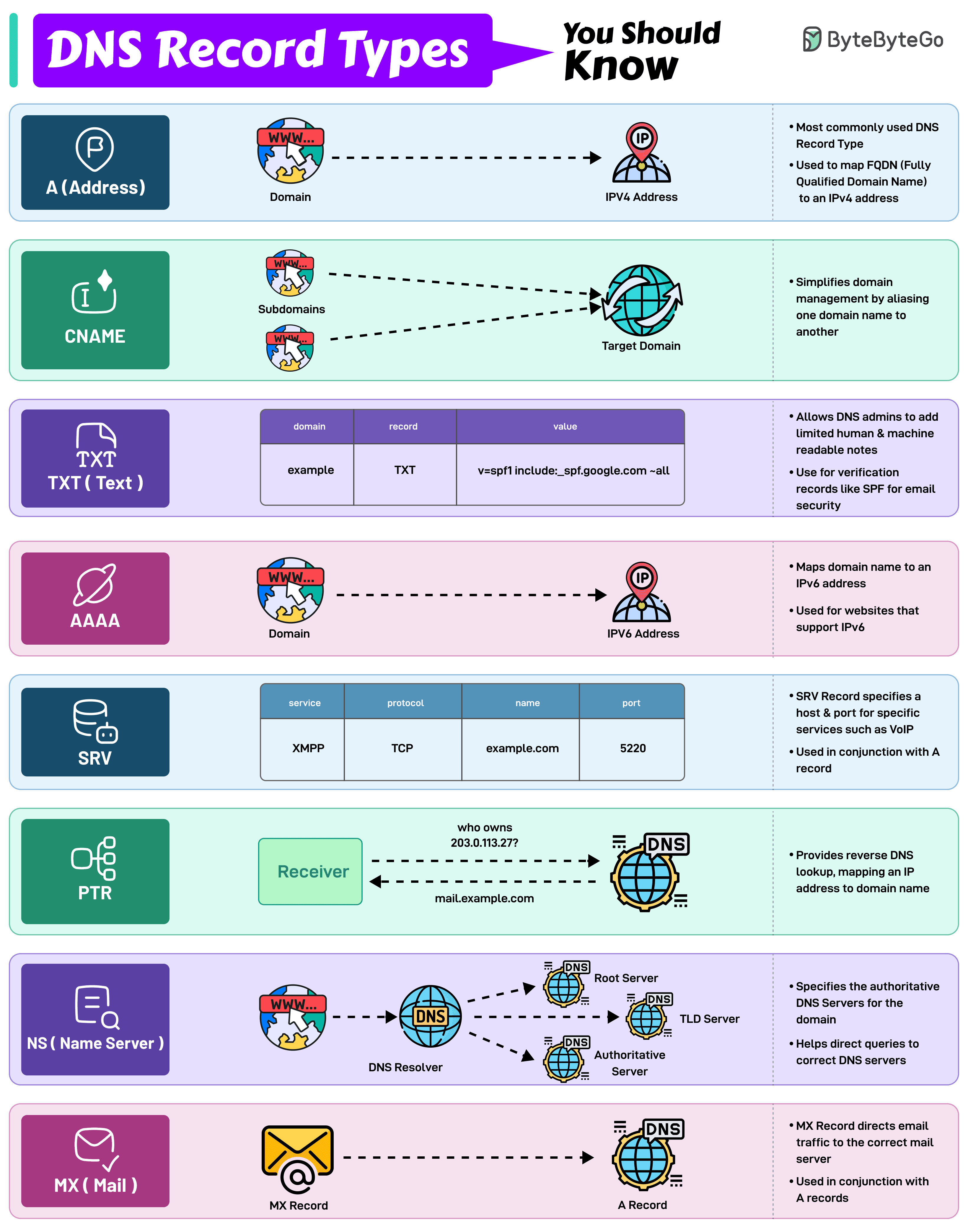
Core DNS Record Types & Their Purpose
Below are the must-know DNS records, their purpose, and real-world use cases.
1. A Record (Address Record)
Maps a domain or subdomain to an IPv4 address.
This is the most fundamental DNS record.
Example:
example.com → 192.168.1.10
Use cases:
- Pointing your root domain to a web server
- Routing subdomains (e.g., api.example.com) to specific infrastructure
2. AAAA Record (IPv6 Address Record)
Same as an A record, but for IPv6 addresses.
Example:
example.com → 2606:2800:220:1:248:1893:25c8:1946
Use cases:
- Supporting modern IPv6 networks
- Reducing NAT overhead, improving routing efficiency
3. CNAME Record (Canonical Name Record)
Points one domain to another domain name instead of an IP address.
Example:
www.example.com → example.com
Use cases:
- CDN routing (Cloudflare, AWS CloudFront)
- Service-based subdomains (login.example.com → auth.service.com)
- Simplifies IP changes — update one A record, not dozens of hostnames
4. MX Record (Mail Exchange Record)
Routes email to the correct mail server(s).
Includes priority — lower number = higher priority.
Example:
Priority 10 → mail.example.com
Use cases:
- Office365 / Google Workspace setup
- Email failover
- Anti-spam routing
5. TXT Record (Text Record)
Holds arbitrary text data. Used extensively for security and verification.
Most common uses:
- SPF (Sender Policy Framework)
Defines which mail servers are allowed to send mail for your domain.
Example:
v=spf1 include:spf.protection.outlook.com -all - DKIM (DomainKeys Identified Mail)
Stores public keys used for email signing. - DMARC
Email authentication + reporting + anti-spoofing. - Domain ownership verification
Used by Google, Microsoft, Cloudflare, AWS, etc.
TXT records are arguably the most security-critical DNS records today.
6. NS Record (Name Server Record)
Specifies which name servers are authoritative for the domain.
Example:
ns1.yourdnsprovider.com
Use cases:
- Delegating DNS hosting
- Splitting zones
- Setting child-zone nameservers
7. SOA Record (Start of Authority)
The first record in any zone file.
Defines:
- Primary nameserver
- Contact email
- Serial number
- Zone transfer settings
- Refresh / retry / expire intervals
Critical for DNS replication and secondary DNS synchronization.
8. PTR Record (Pointer Record / Reverse DNS)
Maps an IP address back to a domain name.
Used primarily in:
- Email reputation systems
- Logging
- Anti-spam systems
- Carrier/ISP reverse lookups
Example:
192.168.1.10 → mail.example.com
Reverse DNS lives in a separate DNS zone managed by whoever owns the IP block (ISP, AWS, Azure, etc.).
9. SRV Record (Service Record)
Specifies host, port, and protocol for specific services.
Use cases:
- Microsoft 365 Autodiscover
- SIP / VoIP
- Kubernetes discovery
- LDAP / Kerberos in Active Directory environments
Example:
_sip._tcp.example.com → 10 5 5060 sipserver.example.com
10. CAA Record (Certificate Authority Authorization)
Controls which Certificate Authorities can issue SSL certificates for your domain.
Example:
example.com → issue "letsencrypt.org"
Great for preventing unauthorized SSL certificate issuance (anti-phishing control).
11. ALIAS / ANAME Record
Not a true DNS RFC record but widely supported by providers.
Allows root domains (example.com) to point to a hostname even though CNAMEs are not allowed at the apex.
Useful for:
- AWS CloudFront
- Managed hosting
- Load balancers
- Failover systems
12. DNSSEC Records (RRSIG, DS, DNSKEY, NSEC, NSEC3)
Used for cryptographic signing of DNS data to prevent spoofing, MITM attacks, and cache poisoning.
You don’t need to memorize every type, but know what they accomplish:
- Validates authenticity of DNS responses
- Protects against forged or tampered DNS data
- Adds a chain of trust from root → TLD → domain
More advanced, but increasingly important.
How DNS Resolution Works (In Simple Terms)
How DNS Resolution Works
-
- User types
example.com - Browser asks the recursive resolver (your ISP, Cloudflare, Google 8.8.8.8, etc.)
- Resolver checks cache
- If unknown, resolver asks:
- Root nameservers
- TLD nameservers (.com)
- Authoritative nameserver (your DNS host)
- Authoritative server replies with the correct record
- Browser connects to the IP returned
Optimizing DNS = improving resolution times + accuracy + reliability.
- User types
DNS TTL Explained
TTL (Time to Live) defines how long a resolver should cache the record.
- 300 seconds (5 min) = standard for dynamic systems
- 3600 seconds (1 hr) = common default
- 86400 seconds (24 hr) = stable static records
When preparing migrations, lower the TTL first, wait for propagation, then make changes.
- Validates authenticity of DNS responses
- Protects against forged or tampered DNS data
- Adds a chain of trust from root → TLD → domain
More advanced, but increasingly important.
Common DNS Mistakes to Avoid
- Using CNAME where A/AAAA is required
- Forgetting to update SPF after changing mail providers
- Missing DKIM = high spam score
- MX pointing to a CNAME (not allowed by RFC)
- Conflicting records for same hostname (A + CNAME)
- Incorrect DMARC policy configuration
- Setting TTL too high before changes
- Setting TTL too low on stable records (increases resolver load)
DNS Best Practices for Modern Infrastructure
- Use redundant authoritative DNS (at least 2 servers)
- Enable DNSSEC if supported
- Implement SPF, DKIM, and DMARC for email protection
- Use CAA records to limit SSL issuance
- Monitor DNS changes with alerts
- Document DNS architecture as part of your network design
- Use short TTL during migrations or DR testing
Final Summary
- Troubleshoot faster
- Secure your domain
- Improve performance
- Enable modern cloud architectures
- Communicate effectively as a Sales Engineer or architect
Whether you're configuring a new website, protecting email flows, or building out a customer solution, mastery of DNS records is essential.
- Supporting modern IPv6 networks
- Reducing NAT overhead, improving routing efficiency
3. CNAME Record (Canonical Name Record)
Points one domain to another domain name instead of an IP address.
Example:
www.example.com → example.com
Use cases:
- CDN routing (Cloudflare, AWS CloudFront)
- Service-based subdomains (login.example.com → auth.service.com)
- Simplifies IP changes — update one A record, not dozens of hostnames
4. MX Record (Mail Exchange Record)
Routes email to the correct mail server(s).
Includes priority — lower number = higher priority.
Example:
Priority 10 → mail.example.com
Use cases:
- Office365 / Google Workspace setup
- Email failover
- Anti-spam routing
5. TXT Record (Text Record)
Holds arbitrary text data. Used extensively for security and verification.
Most common uses:
- SPF (Sender Policy Framework)
Defines which mail servers are allowed to send mail for your domain.
Example:
v=spf1 include:spf.protection.outlook.com -all - DKIM (DomainKeys Identified Mail)
Stores public keys used for email signing. - DMARC
Email authentication + reporting + anti-spoofing. - Domain ownership verification
Used by Google, Microsoft, Cloudflare, AWS, etc.
TXT records are arguably the most security-critical DNS records today.
6. NS Record (Name Server Record)
Specifies which name servers are authoritative for the domain.
Example:
ns1.yourdnsprovider.com
Use cases:
- Delegating DNS hosting
- Splitting zones
- Setting child-zone nameservers
7. SOA Record (Start of Authority)
The first record in any zone file.
Defines:
- Primary nameserver
- Contact email
- Serial number
- Zone transfer settings
- Refresh / retry / expire intervals
Critical for DNS replication and secondary DNS synchronization.
8. PTR Record (Pointer Record / Reverse DNS)
Maps an IP address back to a domain name.
Used primarily in:
- Email reputation systems
- Logging
- Anti-spam systems
- Carrier/ISP reverse lookups
Example:
192.168.1.10 → mail.example.com
Reverse DNS lives in a separate DNS zone managed by whoever owns the IP block (ISP, AWS, Azure, etc.).
9. SRV Record (Service Record)
Specifies host, port, and protocol for specific services.
Use cases:
- Microsoft 365 Autodiscover
- SIP / VoIP
- Kubernetes discovery
- LDAP / Kerberos in Active Directory environments
Example:
_sip._tcp.example.com → 10 5 5060 sipserver.example.com
10. CAA Record (Certificate Authority Authorization)
Controls which Certificate Authorities can issue SSL certificates for your domain.
Example:
example.com → issue "letsencrypt.org"
Great for preventing unauthorized SSL certificate issuance (anti-phishing control).
11. ALIAS / ANAME Record
Not a true DNS RFC record but widely supported by providers.
Allows root domains (example.com) to point to a hostname even though CNAMEs are not allowed at the apex.
Useful for:
- AWS CloudFront
- Managed hosting
- Load balancers
- Failover systems
12. DNSSEC Records (RRSIG, DS, DNSKEY, NSEC, NSEC3)
Used for cryptographic signing of DNS data to prevent spoofing, MITM attacks, and cache poisoning.
You don’t need to memorize every type, but know what they accomplish:
- Validates authenticity of DNS responses
- Protects against forged or tampered DNS data
- Adds a chain of trust from root → TLD → domain
More advanced, but increasingly important.
How DNS Resolution Works (In Simple Terms)
How DNS Resolution Works
-
- User types
example.com - Browser asks the recursive resolver (your ISP, Cloudflare, Google 8.8.8.8, etc.)
- Resolver checks cache
- If unknown, resolver asks:
- Root nameservers
- TLD nameservers (.com)
- Authoritative nameserver (your DNS host)
- Authoritative server replies with the correct record
- Browser connects to the IP returned
Optimizing DNS = improving resolution times + accuracy + reliability.
- User types
DNS TTL Explained
TTL (Time to Live) defines how long a resolver should cache the record.
- 300 seconds (5 min) = standard for dynamic systems
- 3600 seconds (1 hr) = common default
- 86400 seconds (24 hr) = stable static records
When preparing migrations, lower the TTL first, wait for propagation, then make changes.
- Validates authenticity of DNS responses
- Protects against forged or tampered DNS data
- Adds a chain of trust from root → TLD → domain
More advanced, but increasingly important.
Common DNS Mistakes to Avoid
- Using CNAME where A/AAAA is required
- Forgetting to update SPF after changing mail providers
- Missing DKIM = high spam score
- MX pointing to a CNAME (not allowed by RFC)
- Conflicting records for same hostname (A + CNAME)
- Incorrect DMARC policy configuration
- Setting TTL too high before changes
- Setting TTL too low on stable records (increases resolver load)
DNS Best Practices for Modern Infrastructure
- Use redundant authoritative DNS (at least 2 servers)
- Enable DNSSEC if supported
- Implement SPF, DKIM, and DMARC for email protection
- Use CAA records to limit SSL issuance
- Monitor DNS changes with alerts
- Document DNS architecture as part of your network design
- Use short TTL during migrations or DR testing
Final Summary
- Troubleshoot faster
- Secure your domain
- Improve performance
- Enable modern cloud architectures
- Communicate effectively as a Sales Engineer or architect
Whether you're configuring a new website, protecting email flows, or building out a customer solution, mastery of DNS records is essential.
- Your website loads quickly
- Emails deliver correctly
- Subdomains route to the right services
- Security policies like SPF/DMARC protect your domain
- Redundancy and failover work properly
Core DNS Record Types & Their Purpose
Core DNS Record Types & Their Purpose
Below are the must-know DNS records, their purpose, and real-world use cases.
1. A Record (Address Record)
Maps a domain or subdomain to an IPv4 address.
This is the most fundamental DNS record.
Example:
example.com → 192.168.1.10
Use cases:
- Pointing your root domain to a web server
- Routing subdomains (e.g., api.example.com) to specific infrastructure
2. AAAA Record (IPv6 Address Record)
Same as an A record, but for IPv6 addresses.
Example:
example.com → 2606:2800:220:1:248:1893:25c8:1946
Use cases:
- Supporting modern IPv6 networks
- Reducing NAT overhead, improving routing efficiency
3. CNAME Record (Canonical Name Record)
Points one domain to another domain name instead of an IP address.
Example:
www.example.com → example.com
Use cases:
- CDN routing (Cloudflare, AWS CloudFront)
- Service-based subdomains (login.example.com → auth.service.com)
- Simplifies IP changes — update one A record, not dozens of hostnames
4. MX Record (Mail Exchange Record)
Routes email to the correct mail server(s).
Includes priority — lower number = higher priority.
Example:
Priority 10 → mail.example.com
Use cases:
- Office365 / Google Workspace setup
- Email failover
- Anti-spam routing
5. TXT Record (Text Record)
Holds arbitrary text data. Used extensively for security and verification.
Most common uses:
- SPF (Sender Policy Framework)
Defines which mail servers are allowed to send mail for your domain.
Example:
v=spf1 include:spf.protection.outlook.com -all - DKIM (DomainKeys Identified Mail)
Stores public keys used for email signing. - DMARC
Email authentication + reporting + anti-spoofing. - Domain ownership verification
Used by Google, Microsoft, Cloudflare, AWS, etc.
TXT records are arguably the most security-critical DNS records today.
6. NS Record (Name Server Record)
Specifies which name servers are authoritative for the domain.
Example:
ns1.yourdnsprovider.com
Use cases:
- Delegating DNS hosting
- Splitting zones
- Setting child-zone nameservers
7. SOA Record (Start of Authority)
The first record in any zone file.
Defines:
- Primary nameserver
- Contact email
- Serial number
- Zone transfer settings
- Refresh / retry / expire intervals
Critical for DNS replication and secondary DNS synchronization.
8. PTR Record (Pointer Record / Reverse DNS)
Maps an IP address back to a domain name.
Used primarily in:
- Email reputation systems
- Logging
- Anti-spam systems
- Carrier/ISP reverse lookups
Example:
192.168.1.10 → mail.example.com
Reverse DNS lives in a separate DNS zone managed by whoever owns the IP block (ISP, AWS, Azure, etc.).
9. SRV Record (Service Record)
Specifies host, port, and protocol for specific services.
Use cases:
- Microsoft 365 Autodiscover
- SIP / VoIP
- Kubernetes discovery
- LDAP / Kerberos in Active Directory environments
Example:
_sip._tcp.example.com → 10 5 5060 sipserver.example.com
10. CAA Record (Certificate Authority Authorization)
Controls which Certificate Authorities can issue SSL certificates for your domain.
Example:
example.com → issue "letsencrypt.org"
Great for preventing unauthorized SSL certificate issuance (anti-phishing control).
11. ALIAS / ANAME Record
Not a true DNS RFC record but widely supported by providers.
Allows root domains (example.com) to point to a hostname even though CNAMEs are not allowed at the apex.
Useful for:
- AWS CloudFront
- Managed hosting
- Load balancers
- Failover systems
12. DNSSEC Records (RRSIG, DS, DNSKEY, NSEC, NSEC3)
Used for cryptographic signing of DNS data to prevent spoofing, MITM attacks, and cache poisoning.
You don’t need to memorize every type, but know what they accomplish:
- Validates authenticity of DNS responses
- Protects against forged or tampered DNS data
- Adds a chain of trust from root → TLD → domain
More advanced, but increasingly important.
How DNS Resolution Works (In Simple Terms)
How DNS Resolution Works
-
- User types
example.com - Browser asks the recursive resolver (your ISP, Cloudflare, Google 8.8.8.8, etc.)
- Resolver checks cache
- If unknown, resolver asks:
- Root nameservers
- TLD nameservers (.com)
- Authoritative nameserver (your DNS host)
- Authoritative server replies with the correct record
- Browser connects to the IP returned
Optimizing DNS = improving resolution times + accuracy + reliability.
- User types
DNS TTL Explained
TTL (Time to Live) defines how long a resolver should cache the record.
- 300 seconds (5 min) = standard for dynamic systems
- 3600 seconds (1 hr) = common default
- 86400 seconds (24 hr) = stable static records
When preparing migrations, lower the TTL first, wait for propagation, then make changes.
- Validates authenticity of DNS responses
- Protects against forged or tampered DNS data
- Adds a chain of trust from root → TLD → domain
More advanced, but increasingly important.
Common DNS Mistakes to Avoid
- Using CNAME where A/AAAA is required
- Forgetting to update SPF after changing mail providers
- Missing DKIM = high spam score
- MX pointing to a CNAME (not allowed by RFC)
- Conflicting records for same hostname (A + CNAME)
- Incorrect DMARC policy configuration
- Setting TTL too high before changes
- Setting TTL too low on stable records (increases resolver load)
DNS Best Practices for Modern Infrastructure
- Use redundant authoritative DNS (at least 2 servers)
- Enable DNSSEC if supported
- Implement SPF, DKIM, and DMARC for email protection
- Use CAA records to limit SSL issuance
- Monitor DNS changes with alerts
- Document DNS architecture as part of your network design
- Use short TTL during migrations or DR testing
Final Summary
- Troubleshoot faster
- Secure your domain
- Improve performance
- Enable modern cloud architectures
- Communicate effectively as a Sales Engineer or architect
Whether you're configuring a new website, protecting email flows, or building out a customer solution, mastery of DNS records is essential.
- Your website loads quickly
- Emails deliver correctly
- Subdomains route to the right services
- Security policies like SPF/DMARC protect your domain
- Redundancy and failover work properly
Core DNS Record Types & Their Purpose
Core DNS Record Types & Their Purpose
Below are the must-know DNS records, their purpose, and real-world use cases.
1. A Record (Address Record)
Maps a domain or subdomain to an IPv4 address.
This is the most fundamental DNS record.
Example:
example.com → 192.168.1.10
Use cases:
- Pointing your root domain to a web server
- Routing subdomains (e.g., api.example.com) to specific infrastructure
2. AAAA Record (IPv6 Address Record)
Same as an A record, but for IPv6 addresses.
Example:
example.com → 2606:2800:220:1:248:1893:25c8:1946
Use cases:
- Supporting modern IPv6 networks
- Reducing NAT overhead, improving routing efficiency
3. CNAME Record (Canonical Name Record)
Points one domain to another domain name instead of an IP address.
Example:
www.example.com → example.com
Use cases:
- CDN routing (Cloudflare, AWS CloudFront)
- Service-based subdomains (login.example.com → auth.service.com)
- Simplifies IP changes — update one A record, not dozens of hostnames
4. MX Record (Mail Exchange Record)
Routes email to the correct mail server(s).
Includes priority — lower number = higher priority.
Example:
Priority 10 → mail.example.com
Use cases:
- Office365 / Google Workspace setup
- Email failover
- Anti-spam routing
5. TXT Record (Text Record)
Holds arbitrary text data. Used extensively for security and verification.
Most common uses:
- SPF (Sender Policy Framework)
Defines which mail servers are allowed to send mail for your domain.
Example:
v=spf1 include:spf.protection.outlook.com -all - DKIM (DomainKeys Identified Mail)
Stores public keys used for email signing. - DMARC
Email authentication + reporting + anti-spoofing. - Domain ownership verification
Used by Google, Microsoft, Cloudflare, AWS, etc.
TXT records are arguably the most security-critical DNS records today.
6. NS Record (Name Server Record)
Specifies which name servers are authoritative for the domain.
Example:
ns1.yourdnsprovider.com
Use cases:
- Delegating DNS hosting
- Splitting zones
- Setting child-zone nameservers
7. SOA Record (Start of Authority)
The first record in any zone file.
Defines:
- Primary nameserver
- Contact email
- Serial number
- Zone transfer settings
- Refresh / retry / expire intervals
Critical for DNS replication and secondary DNS synchronization.
8. PTR Record (Pointer Record / Reverse DNS)
Maps an IP address back to a domain name.
Used primarily in:
- Email reputation systems
- Logging
- Anti-spam systems
- Carrier/ISP reverse lookups
Example:
192.168.1.10 → mail.example.com
Reverse DNS lives in a separate DNS zone managed by whoever owns the IP block (ISP, AWS, Azure, etc.).
9. SRV Record (Service Record)
Specifies host, port, and protocol for specific services.
Use cases:
- Microsoft 365 Autodiscover
- SIP / VoIP
- Kubernetes discovery
- LDAP / Kerberos in Active Directory environments
Example:
_sip._tcp.example.com → 10 5 5060 sipserver.example.com
10. CAA Record (Certificate Authority Authorization)
Controls which Certificate Authorities can issue SSL certificates for your domain.
Example:
example.com → issue "letsencrypt.org"
Great for preventing unauthorized SSL certificate issuance (anti-phishing control).
11. ALIAS / ANAME Record
Not a true DNS RFC record but widely supported by providers.
Allows root domains (example.com) to point to a hostname even though CNAMEs are not allowed at the apex.
Useful for:
- AWS CloudFront
- Managed hosting
- Load balancers
- Failover systems
12. DNSSEC Records (RRSIG, DS, DNSKEY, NSEC, NSEC3)
Used for cryptographic signing of DNS data to prevent spoofing, MITM attacks, and cache poisoning.
You don’t need to memorize every type, but know what they accomplish:
- Validates authenticity of DNS responses
- Protects against forged or tampered DNS data
- Adds a chain of trust from root → TLD → domain
More advanced, but increasingly important.
How DNS Resolution Works (In Simple Terms)
How DNS Resolution Works
-
- User types
example.com - Browser asks the recursive resolver (your ISP, Cloudflare, Google 8.8.8.8, etc.)
- Resolver checks cache
- If unknown, resolver asks:
- Root nameservers
- TLD nameservers (.com)
- Authoritative nameserver (your DNS host)
- Authoritative server replies with the correct record
- Browser connects to the IP returned
Optimizing DNS = improving resolution times + accuracy + reliability.
- User types
DNS TTL Explained
TTL (Time to Live) defines how long a resolver should cache the record.
- 300 seconds (5 min) = standard for dynamic systems
- 3600 seconds (1 hr) = common default
- 86400 seconds (24 hr) = stable static records
When preparing migrations, lower the TTL first, wait for propagation, then make changes.
- Validates authenticity of DNS responses
- Protects against forged or tampered DNS data
- Adds a chain of trust from root → TLD → domain
More advanced, but increasingly important.
Common DNS Mistakes to Avoid
- Using CNAME where A/AAAA is required
- Forgetting to update SPF after changing mail providers
- Missing DKIM = high spam score
- MX pointing to a CNAME (not allowed by RFC)
- Conflicting records for same hostname (A + CNAME)
- Incorrect DMARC policy configuration
- Setting TTL too high before changes
- Setting TTL too low on stable records (increases resolver load)
DNS Best Practices for Modern Infrastructure
- Use redundant authoritative DNS (at least 2 servers)
- Enable DNSSEC if supported
- Implement SPF, DKIM, and DMARC for email protection
- Use CAA records to limit SSL issuance
- Monitor DNS changes with alerts
- Document DNS architecture as part of your network design
- Use short TTL during migrations or DR testing
Final Summary
- Troubleshoot faster
- Secure your domain
- Improve performance
- Enable modern cloud architectures
- Communicate effectively as a Sales Engineer or architect
Whether you're configuring a new website, protecting email flows, or building out a customer solution, mastery of DNS records is essential.
- Supporting modern IPv6 networks
- Reducing NAT overhead, improving routing efficiency
3. CNAME Record (Canonical Name Record)
Points one domain to another domain name instead of an IP address.
Example:
www.example.com → example.com
Use cases:
- CDN routing (Cloudflare, AWS CloudFront)
- Service-based subdomains (login.example.com → auth.service.com)
- Simplifies IP changes — update one A record, not dozens of hostnames
4. MX Record (Mail Exchange Record)
Routes email to the correct mail server(s).
Includes priority — lower number = higher priority.
Example:
Priority 10 → mail.example.com
Use cases:
- Office365 / Google Workspace setup
- Email failover
- Anti-spam routing
5. TXT Record (Text Record)
Holds arbitrary text data. Used extensively for security and verification.
Most common uses:
- SPF (Sender Policy Framework)
Defines which mail servers are allowed to send mail for your domain.
Example:
v=spf1 include:spf.protection.outlook.com -all - DKIM (DomainKeys Identified Mail)
Stores public keys used for email signing. - DMARC
Email authentication + reporting + anti-spoofing. - Domain ownership verification
Used by Google, Microsoft, Cloudflare, AWS, etc.
TXT records are arguably the most security-critical DNS records today.
6. NS Record (Name Server Record)
Specifies which name servers are authoritative for the domain.
Example:
ns1.yourdnsprovider.com
Use cases:
- Delegating DNS hosting
- Splitting zones
- Setting child-zone nameservers
7. SOA Record (Start of Authority)
The first record in any zone file.
Defines:
- Primary nameserver
- Contact email
- Serial number
- Zone transfer settings
- Refresh / retry / expire intervals
Critical for DNS replication and secondary DNS synchronization.
8. PTR Record (Pointer Record / Reverse DNS)
Maps an IP address back to a domain name.
Used primarily in:
- Email reputation systems
- Logging
- Anti-spam systems
- Carrier/ISP reverse lookups
Example:
192.168.1.10 → mail.example.com
Reverse DNS lives in a separate DNS zone managed by whoever owns the IP block (ISP, AWS, Azure, etc.).
9. SRV Record (Service Record)
Specifies host, port, and protocol for specific services.
Use cases:
- Microsoft 365 Autodiscover
- SIP / VoIP
- Kubernetes discovery
- LDAP / Kerberos in Active Directory environments
Example:
_sip._tcp.example.com → 10 5 5060 sipserver.example.com
10. CAA Record (Certificate Authority Authorization)
Controls which Certificate Authorities can issue SSL certificates for your domain.
Example:
example.com → issue "letsencrypt.org"
Great for preventing unauthorized SSL certificate issuance (anti-phishing control).
11. ALIAS / ANAME Record
Not a true DNS RFC record but widely supported by providers.
Allows root domains (example.com) to point to a hostname even though CNAMEs are not allowed at the apex.
Useful for:
- AWS CloudFront
- Managed hosting
- Load balancers
- Failover systems
12. DNSSEC Records (RRSIG, DS, DNSKEY, NSEC, NSEC3)
Used for cryptographic signing of DNS data to prevent spoofing, MITM attacks, and cache poisoning.
You don’t need to memorize every type, but know what they accomplish:
- Validates authenticity of DNS responses
- Protects against forged or tampered DNS data
- Adds a chain of trust from root → TLD → domain
More advanced, but increasingly important.
How DNS Resolution Works (In Simple Terms)
How DNS Resolution Works
-
- User types
example.com - Browser asks the recursive resolver (your ISP, Cloudflare, Google 8.8.8.8, etc.)
- Resolver checks cache
- If unknown, resolver asks:
- Root nameservers
- TLD nameservers (.com)
- Authoritative nameserver (your DNS host)
- Authoritative server replies with the correct record
- Browser connects to the IP returned
Optimizing DNS = improving resolution times + accuracy + reliability.
- User types
DNS TTL Explained
TTL (Time to Live) defines how long a resolver should cache the record.
- 300 seconds (5 min) = standard for dynamic systems
- 3600 seconds (1 hr) = common default
- 86400 seconds (24 hr) = stable static records
When preparing migrations, lower the TTL first, wait for propagation, then make changes.
- Validates authenticity of DNS responses
- Protects against forged or tampered DNS data
- Adds a chain of trust from root → TLD → domain
More advanced, but increasingly important.
Common DNS Mistakes to Avoid
- Using CNAME where A/AAAA is required
- Forgetting to update SPF after changing mail providers
- Missing DKIM = high spam score
- MX pointing to a CNAME (not allowed by RFC)
- Conflicting records for same hostname (A + CNAME)
- Incorrect DMARC policy configuration
- Setting TTL too high before changes
- Setting TTL too low on stable records (increases resolver load)
DNS Best Practices for Modern Infrastructure
- Use redundant authoritative DNS (at least 2 servers)
- Enable DNSSEC if supported
- Implement SPF, DKIM, and DMARC for email protection
- Use CAA records to limit SSL issuance
- Monitor DNS changes with alerts
- Document DNS architecture as part of your network design
- Use short TTL during migrations or DR testing
Final Summary
- Troubleshoot faster
- Secure your domain
- Improve performance
- Enable modern cloud architectures
- Communicate effectively as a Sales Engineer or architect
Whether you're configuring a new website, protecting email flows, or building out a customer solution, mastery of DNS records is essential.
- Your website loads quickly
- Emails deliver correctly
- Subdomains route to the right services
- Security policies like SPF/DMARC protect your domain
- Redundancy and failover work properly
Core DNS Record Types & Their Purpose
Core DNS Record Types & Their Purpose
Below are the must-know DNS records, their purpose, and real-world use cases.
1. A Record (Address Record)
Maps a domain or subdomain to an IPv4 address.
This is the most fundamental DNS record.
Example:
example.com → 192.168.1.10
Use cases:
- Pointing your root domain to a web server
- Routing subdomains (e.g., api.example.com) to specific infrastructure
2. AAAA Record (IPv6 Address Record)
Same as an A record, but for IPv6 addresses.
Example:
example.com → 2606:2800:220:1:248:1893:25c8:1946
Use cases:
- Supporting modern IPv6 networks
- Reducing NAT overhead, improving routing efficiency
3. CNAME Record (Canonical Name Record)
Points one domain to another domain name instead of an IP address.
Example:
www.example.com → example.com
Use cases:
- CDN routing (Cloudflare, AWS CloudFront)
- Service-based subdomains (login.example.com → auth.service.com)
- Simplifies IP changes — update one A record, not dozens of hostnames
4. MX Record (Mail Exchange Record)
Routes email to the correct mail server(s).
Includes priority — lower number = higher priority.
Example:
Priority 10 → mail.example.com
Use cases:
- Office365 / Google Workspace setup
- Email failover
- Anti-spam routing
5. TXT Record (Text Record)
Holds arbitrary text data. Used extensively for security and verification.
Most common uses:
- SPF (Sender Policy Framework)
Defines which mail servers are allowed to send mail for your domain.
Example:
v=spf1 include:spf.protection.outlook.com -all - DKIM (DomainKeys Identified Mail)
Stores public keys used for email signing. - DMARC
Email authentication + reporting + anti-spoofing. - Domain ownership verification
Used by Google, Microsoft, Cloudflare, AWS, etc.
TXT records are arguably the most security-critical DNS records today.
6. NS Record (Name Server Record)
Specifies which name servers are authoritative for the domain.
Example:
ns1.yourdnsprovider.com
Use cases:
- Delegating DNS hosting
- Splitting zones
- Setting child-zone nameservers
7. SOA Record (Start of Authority)
The first record in any zone file.
Defines:
- Primary nameserver
- Contact email
- Serial number
- Zone transfer settings
- Refresh / retry / expire intervals
Critical for DNS replication and secondary DNS synchronization.
8. PTR Record (Pointer Record / Reverse DNS)
Maps an IP address back to a domain name.
Used primarily in:
- Email reputation systems
- Logging
- Anti-spam systems
- Carrier/ISP reverse lookups
Example:
192.168.1.10 → mail.example.com
Reverse DNS lives in a separate DNS zone managed by whoever owns the IP block (ISP, AWS, Azure, etc.).
9. SRV Record (Service Record)
Specifies host, port, and protocol for specific services.
Use cases:
- Microsoft 365 Autodiscover
- SIP / VoIP
- Kubernetes discovery
- LDAP / Kerberos in Active Directory environments
Example:
_sip._tcp.example.com → 10 5 5060 sipserver.example.com
10. CAA Record (Certificate Authority Authorization)
Controls which Certificate Authorities can issue SSL certificates for your domain.
Example:
example.com → issue "letsencrypt.org"
Great for preventing unauthorized SSL certificate issuance (anti-phishing control).
11. ALIAS / ANAME Record
Not a true DNS RFC record but widely supported by providers.
Allows root domains (example.com) to point to a hostname even though CNAMEs are not allowed at the apex.
Useful for:
- AWS CloudFront
- Managed hosting
- Load balancers
- Failover systems
12. DNSSEC Records (RRSIG, DS, DNSKEY, NSEC, NSEC3)
Used for cryptographic signing of DNS data to prevent spoofing, MITM attacks, and cache poisoning.
You don’t need to memorize every type, but know what they accomplish:
- Validates authenticity of DNS responses
- Protects against forged or tampered DNS data
- Adds a chain of trust from root → TLD → domain
More advanced, but increasingly important.
How DNS Resolution Works (In Simple Terms)
How DNS Resolution Works
-
- User types
example.com - Browser asks the recursive resolver (your ISP, Cloudflare, Google 8.8.8.8, etc.)
- Resolver checks cache
- If unknown, resolver asks:
- Root nameservers
- TLD nameservers (.com)
- Authoritative nameserver (your DNS host)
- Authoritative server replies with the correct record
- Browser connects to the IP returned
Optimizing DNS = improving resolution times + accuracy + reliability.
- User types
DNS TTL Explained
TTL (Time to Live) defines how long a resolver should cache the record.
- 300 seconds (5 min) = standard for dynamic systems
- 3600 seconds (1 hr) = common default
- 86400 seconds (24 hr) = stable static records
When preparing migrations, lower the TTL first, wait for propagation, then make changes.
- Validates authenticity of DNS responses
- Protects against forged or tampered DNS data
- Adds a chain of trust from root → TLD → domain
More advanced, but increasingly important.
Common DNS Mistakes to Avoid
- Using CNAME where A/AAAA is required
- Forgetting to update SPF after changing mail providers
- Missing DKIM = high spam score
- MX pointing to a CNAME (not allowed by RFC)
- Conflicting records for same hostname (A + CNAME)
- Incorrect DMARC policy configuration
- Setting TTL too high before changes
- Setting TTL too low on stable records (increases resolver load)
DNS Best Practices for Modern Infrastructure
- Use redundant authoritative DNS (at least 2 servers)
- Enable DNSSEC if supported
- Implement SPF, DKIM, and DMARC for email protection
- Use CAA records to limit SSL issuance
- Monitor DNS changes with alerts
- Document DNS architecture as part of your network design
- Use short TTL during migrations or DR testing
Final Summary
- Troubleshoot faster
- Secure your domain
- Improve performance
- Enable modern cloud architectures
- Communicate effectively as a Sales Engineer or architect
Whether you're configuring a new website, protecting email flows, or building out a customer solution, mastery of DNS records is essential.
- Supporting modern IPv6 networks
- Reducing NAT overhead, improving routing efficiency
3. CNAME Record (Canonical Name Record)
Points one domain to another domain name instead of an IP address.
Example:
www.example.com → example.com
Use cases:
- CDN routing (Cloudflare, AWS CloudFront)
- Service-based subdomains (login.example.com → auth.service.com)
- Simplifies IP changes — update one A record, not dozens of hostnames
4. MX Record (Mail Exchange Record)
Routes email to the correct mail server(s).
Includes priority — lower number = higher priority.
Example:
Priority 10 → mail.example.com
Use cases:
- Office365 / Google Workspace setup
- Email failover
- Anti-spam routing
5. TXT Record (Text Record)
Holds arbitrary text data. Used extensively for security and verification.
Most common uses:
- SPF (Sender Policy Framework)
Defines which mail servers are allowed to send mail for your domain.
Example:
v=spf1 include:spf.protection.outlook.com -all - DKIM (DomainKeys Identified Mail)
Stores public keys used for email signing. - DMARC
Email authentication + reporting + anti-spoofing. - Domain ownership verification
Used by Google, Microsoft, Cloudflare, AWS, etc.
TXT records are arguably the most security-critical DNS records today.
6. NS Record (Name Server Record)
Specifies which name servers are authoritative for the domain.
Example:
ns1.yourdnsprovider.com
Use cases:
- Delegating DNS hosting
- Splitting zones
- Setting child-zone nameservers
7. SOA Record (Start of Authority)
The first record in any zone file.
Defines:
- Primary nameserver
- Contact email
- Serial number
- Zone transfer settings
- Refresh / retry / expire intervals
Critical for DNS replication and secondary DNS synchronization.
8. PTR Record (Pointer Record / Reverse DNS)
Maps an IP address back to a domain name.
Used primarily in:
- Email reputation systems
- Logging
- Anti-spam systems
- Carrier/ISP reverse lookups
Example:
192.168.1.10 → mail.example.com
Reverse DNS lives in a separate DNS zone managed by whoever owns the IP block (ISP, AWS, Azure, etc.).
9. SRV Record (Service Record)
Specifies host, port, and protocol for specific services.
Use cases:
- Microsoft 365 Autodiscover
- SIP / VoIP
- Kubernetes discovery
- LDAP / Kerberos in Active Directory environments
Example:
_sip._tcp.example.com → 10 5 5060 sipserver.example.com
10. CAA Record (Certificate Authority Authorization)
Controls which Certificate Authorities can issue SSL certificates for your domain.
Example:
example.com → issue "letsencrypt.org"
Great for preventing unauthorized SSL certificate issuance (anti-phishing control).
11. ALIAS / ANAME Record
Not a true DNS RFC record but widely supported by providers.
Allows root domains (example.com) to point to a hostname even though CNAMEs are not allowed at the apex.
Useful for:
- AWS CloudFront
- Managed hosting
- Load balancers
- Failover systems
12. DNSSEC Records (RRSIG, DS, DNSKEY, NSEC, NSEC3)
Used for cryptographic signing of DNS data to prevent spoofing, MITM attacks, and cache poisoning.
You don’t need to memorize every type, but know what they accomplish:
- Validates authenticity of DNS responses
- Protects against forged or tampered DNS data
- Adds a chain of trust from root → TLD → domain
More advanced, but increasingly important.
How DNS Resolution Works (In Simple Terms)
How DNS Resolution Works
-
- User types
example.com - Browser asks the recursive resolver (your ISP, Cloudflare, Google 8.8.8.8, etc.)
- Resolver checks cache
- If unknown, resolver asks:
- Root nameservers
- TLD nameservers (.com)
- Authoritative nameserver (your DNS host)
- Authoritative server replies with the correct record
- Browser connects to the IP returned
Optimizing DNS = improving resolution times + accuracy + reliability.
- User types
DNS TTL Explained
TTL (Time to Live) defines how long a resolver should cache the record.
- 300 seconds (5 min) = standard for dynamic systems
- 3600 seconds (1 hr) = common default
- 86400 seconds (24 hr) = stable static records
When preparing migrations, lower the TTL first, wait for propagation, then make changes.
- Validates authenticity of DNS responses
- Protects against forged or tampered DNS data
- Adds a chain of trust from root → TLD → domain
More advanced, but increasingly important.
Common DNS Mistakes to Avoid
- Using CNAME where A/AAAA is required
- Forgetting to update SPF after changing mail providers
- Missing DKIM = high spam score
- MX pointing to a CNAME (not allowed by RFC)
- Conflicting records for same hostname (A + CNAME)
- Incorrect DMARC policy configuration
- Setting TTL too high before changes
- Setting TTL too low on stable records (increases resolver load)
DNS Best Practices for Modern Infrastructure
- Use redundant authoritative DNS (at least 2 servers)
- Enable DNSSEC if supported
- Implement SPF, DKIM, and DMARC for email protection
- Use CAA records to limit SSL issuance
- Monitor DNS changes with alerts
- Document DNS architecture as part of your network design
- Use short TTL during migrations or DR testing
Final Summary
- Troubleshoot faster
- Secure your domain
- Improve performance
- Enable modern cloud architectures
- Communicate effectively as a Sales Engineer or architect
Whether you're configuring a new website, protecting email flows, or building out a customer solution, mastery of DNS records is essential.
- Your website loads quickly
- Emails deliver correctly
- Subdomains route to the right services
- Security policies like SPF/DMARC protect your domain
- Redundancy and failover work properly
Core DNS Record Types & Their Purpose
Core DNS Record Types & Their Purpose
Below are the must-know DNS records, their purpose, and real-world use cases.
1. A Record (Address Record)
Maps a domain or subdomain to an IPv4 address.
This is the most fundamental DNS record.
Example:
example.com → 192.168.1.10
Use cases:
- Pointing your root domain to a web server
- Routing subdomains (e.g., api.example.com) to specific infrastructure
2. AAAA Record (IPv6 Address Record)
Same as an A record, but for IPv6 addresses.
Example:
example.com → 2606:2800:220:1:248:1893:25c8:1946
Use cases:
- Supporting modern IPv6 networks
- Reducing NAT overhead, improving routing efficiency
3. CNAME Record (Canonical Name Record)
Points one domain to another domain name instead of an IP address.
Example:
www.example.com → example.com
Use cases:
- CDN routing (Cloudflare, AWS CloudFront)
- Service-based subdomains (login.example.com → auth.service.com)
- Simplifies IP changes — update one A record, not dozens of hostnames
4. MX Record (Mail Exchange Record)
Routes email to the correct mail server(s).
Includes priority — lower number = higher priority.
Example:
Priority 10 → mail.example.com
Use cases:
- Office365 / Google Workspace setup
- Email failover
- Anti-spam routing
5. TXT Record (Text Record)
Holds arbitrary text data. Used extensively for security and verification.
Most common uses:
- SPF (Sender Policy Framework)
Defines which mail servers are allowed to send mail for your domain.
Example:
v=spf1 include:spf.protection.outlook.com -all - DKIM (DomainKeys Identified Mail)
Stores public keys used for email signing. - DMARC
Email authentication + reporting + anti-spoofing. - Domain ownership verification
Used by Google, Microsoft, Cloudflare, AWS, etc.
TXT records are arguably the most security-critical DNS records today.
6. NS Record (Name Server Record)
Specifies which name servers are authoritative for the domain.
Example:
ns1.yourdnsprovider.com
Use cases:
- Delegating DNS hosting
- Splitting zones
- Setting child-zone nameservers
7. SOA Record (Start of Authority)
The first record in any zone file.
Defines:
- Primary nameserver
- Contact email
- Serial number
- Zone transfer settings
- Refresh / retry / expire intervals
Critical for DNS replication and secondary DNS synchronization.
8. PTR Record (Pointer Record / Reverse DNS)
Maps an IP address back to a domain name.
Used primarily in:
- Email reputation systems
- Logging
- Anti-spam systems
- Carrier/ISP reverse lookups
Example:
192.168.1.10 → mail.example.com
Reverse DNS lives in a separate DNS zone managed by whoever owns the IP block (ISP, AWS, Azure, etc.).
9. SRV Record (Service Record)
Specifies host, port, and protocol for specific services.
Use cases:
- Microsoft 365 Autodiscover
- SIP / VoIP
- Kubernetes discovery
- LDAP / Kerberos in Active Directory environments
Example:
_sip._tcp.example.com → 10 5 5060 sipserver.example.com
10. CAA Record (Certificate Authority Authorization)
Controls which Certificate Authorities can issue SSL certificates for your domain.
Example:
example.com → issue "letsencrypt.org"
Great for preventing unauthorized SSL certificate issuance (anti-phishing control).
11. ALIAS / ANAME Record
Not a true DNS RFC record but widely supported by providers.
Allows root domains (example.com) to point to a hostname even though CNAMEs are not allowed at the apex.
Useful for:
- AWS CloudFront
- Managed hosting
- Load balancers
- Failover systems
12. DNSSEC Records (RRSIG, DS, DNSKEY, NSEC, NSEC3)
Used for cryptographic signing of DNS data to prevent spoofing, MITM attacks, and cache poisoning.
You don’t need to memorize every type, but know what they accomplish:
- Validates authenticity of DNS responses
- Protects against forged or tampered DNS data
- Adds a chain of trust from root → TLD → domain
More advanced, but increasingly important.
How DNS Resolution Works (In Simple Terms)
How DNS Resolution Works
-
- User types
example.com - Browser asks the recursive resolver (your ISP, Cloudflare, Google 8.8.8.8, etc.)
- Resolver checks cache
- If unknown, resolver asks:
- Root nameservers
- TLD nameservers (.com)
- Authoritative nameserver (your DNS host)
- Authoritative server replies with the correct record
- Browser connects to the IP returned
Optimizing DNS = improving resolution times + accuracy + reliability.
- User types
DNS TTL Explained
TTL (Time to Live) defines how long a resolver should cache the record.
- 300 seconds (5 min) = standard for dynamic systems
- 3600 seconds (1 hr) = common default
- 86400 seconds (24 hr) = stable static records
When preparing migrations, lower the TTL first, wait for propagation, then make changes.
- Validates authenticity of DNS responses
- Protects against forged or tampered DNS data
- Adds a chain of trust from root → TLD → domain
More advanced, but increasingly important.
Common DNS Mistakes to Avoid
- Using CNAME where A/AAAA is required
- Forgetting to update SPF after changing mail providers
- Missing DKIM = high spam score
- MX pointing to a CNAME (not allowed by RFC)
- Conflicting records for same hostname (A + CNAME)
- Incorrect DMARC policy configuration
- Setting TTL too high before changes
- Setting TTL too low on stable records (increases resolver load)
DNS Best Practices for Modern Infrastructure
- Use redundant authoritative DNS (at least 2 servers)
- Enable DNSSEC if supported
- Implement SPF, DKIM, and DMARC for email protection
- Use CAA records to limit SSL issuance
- Monitor DNS changes with alerts
- Document DNS architecture as part of your network design
- Use short TTL during migrations or DR testing
Final Summary
- Troubleshoot faster
- Secure your domain
- Improve performance
- Enable modern cloud architectures
- Communicate effectively as a Sales Engineer or architect
Whether you're configuring a new website, protecting email flows, or building out a customer solution, mastery of DNS records is essential.
- Your website loads quickly
- Emails deliver correctly
- Subdomains route to the right services
- Security policies like SPF/DMARC protect your domain
- Redundancy and failover work properly
Core DNS Record Types & Their Purpose
Core DNS Record Types & Their Purpose
Below are the must-know DNS records, their purpose, and real-world use cases.
1. A Record (Address Record)
Maps a domain or subdomain to an IPv4 address.
This is the most fundamental DNS record.
Example:
example.com → 192.168.1.10
Use cases:
- Pointing your root domain to a web server
- Routing subdomains (e.g., api.example.com) to specific infrastructure
2. AAAA Record (IPv6 Address Record)
Same as an A record, but for IPv6 addresses.
Example:
example.com → 2606:2800:220:1:248:1893:25c8:1946
Use cases:
- Supporting modern IPv6 networks
- Reducing NAT overhead, improving routing efficiency
3. CNAME Record (Canonical Name Record)
Points one domain to another domain name instead of an IP address.
Example:
www.example.com → example.com
Use cases:
- CDN routing (Cloudflare, AWS CloudFront)
- Service-based subdomains (login.example.com → auth.service.com)
- Simplifies IP changes — update one A record, not dozens of hostnames
4. MX Record (Mail Exchange Record)
Routes email to the correct mail server(s).
Includes priority — lower number = higher priority.
Example:
Priority 10 → mail.example.com
Use cases:
- Office365 / Google Workspace setup
- Email failover
- Anti-spam routing
5. TXT Record (Text Record)
Holds arbitrary text data. Used extensively for security and verification.
Most common uses:
- SPF (Sender Policy Framework)
Defines which mail servers are allowed to send mail for your domain.
Example:
v=spf1 include:spf.protection.outlook.com -all - DKIM (DomainKeys Identified Mail)
Stores public keys used for email signing. - DMARC
Email authentication + reporting + anti-spoofing. - Domain ownership verification
Used by Google, Microsoft, Cloudflare, AWS, etc.
TXT records are arguably the most security-critical DNS records today.
6. NS Record (Name Server Record)
Specifies which name servers are authoritative for the domain.
Example:
ns1.yourdnsprovider.com
Use cases:
- Delegating DNS hosting
- Splitting zones
- Setting child-zone nameservers
7. SOA Record (Start of Authority)
The first record in any zone file.
Defines:
- Primary nameserver
- Contact email
- Serial number
- Zone transfer settings
- Refresh / retry / expire intervals
Critical for DNS replication and secondary DNS synchronization.
8. PTR Record (Pointer Record / Reverse DNS)
Maps an IP address back to a domain name.
Used primarily in:
- Email reputation systems
- Logging
- Anti-spam systems
- Carrier/ISP reverse lookups
Example:
192.168.1.10 → mail.example.com
Reverse DNS lives in a separate DNS zone managed by whoever owns the IP block (ISP, AWS, Azure, etc.).
9. SRV Record (Service Record)
Specifies host, port, and protocol for specific services.
Use cases:
- Microsoft 365 Autodiscover
- SIP / VoIP
- Kubernetes discovery
- LDAP / Kerberos in Active Directory environments
Example:
_sip._tcp.example.com → 10 5 5060 sipserver.example.com
10. CAA Record (Certificate Authority Authorization)
Controls which Certificate Authorities can issue SSL certificates for your domain.
Example:
example.com → issue "letsencrypt.org"
Great for preventing unauthorized SSL certificate issuance (anti-phishing control).
11. ALIAS / ANAME Record
Not a true DNS RFC record but widely supported by providers.
Allows root domains (example.com) to point to a hostname even though CNAMEs are not allowed at the apex.
Useful for:
- AWS CloudFront
- Managed hosting
- Load balancers
- Failover systems
12. DNSSEC Records (RRSIG, DS, DNSKEY, NSEC, NSEC3)
Used for cryptographic signing of DNS data to prevent spoofing, MITM attacks, and cache poisoning.
You don’t need to memorize every type, but know what they accomplish:
- Validates authenticity of DNS responses
- Protects against forged or tampered DNS data
- Adds a chain of trust from root → TLD → domain
More advanced, but increasingly important.
How DNS Resolution Works (In Simple Terms)
How DNS Resolution Works
-
- User types
example.com - Browser asks the recursive resolver (your ISP, Cloudflare, Google 8.8.8.8, etc.)
- Resolver checks cache
- If unknown, resolver asks:
- Root nameservers
- TLD nameservers (.com)
- Authoritative nameserver (your DNS host)
- Authoritative server replies with the correct record
- Browser connects to the IP returned
Optimizing DNS = improving resolution times + accuracy + reliability.
- User types
DNS TTL Explained
TTL (Time to Live) defines how long a resolver should cache the record.
- 300 seconds (5 min) = standard for dynamic systems
- 3600 seconds (1 hr) = common default
- 86400 seconds (24 hr) = stable static records
When preparing migrations, lower the TTL first, wait for propagation, then make changes.
- Validates authenticity of DNS responses
- Protects against forged or tampered DNS data
- Adds a chain of trust from root → TLD → domain
More advanced, but increasingly important.
Common DNS Mistakes to Avoid
- Using CNAME where A/AAAA is required
- Forgetting to update SPF after changing mail providers
- Missing DKIM = high spam score
- MX pointing to a CNAME (not allowed by RFC)
- Conflicting records for same hostname (A + CNAME)
- Incorrect DMARC policy configuration
- Setting TTL too high before changes
- Setting TTL too low on stable records (increases resolver load)
DNS Best Practices for Modern Infrastructure
- Use redundant authoritative DNS (at least 2 servers)
- Enable DNSSEC if supported
- Implement SPF, DKIM, and DMARC for email protection
- Use CAA records to limit SSL issuance
- Monitor DNS changes with alerts
- Document DNS architecture as part of your network design
- Use short TTL during migrations or DR testing
Final Summary
- Troubleshoot faster
- Secure your domain
- Improve performance
- Enable modern cloud architectures
- Communicate effectively as a Sales Engineer or architect
Whether you're configuring a new website, protecting email flows, or building out a customer solution, mastery of DNS records is essential.
- Supporting modern IPv6 networks
- Reducing NAT overhead, improving routing efficiency
3. CNAME Record (Canonical Name Record)
Points one domain to another domain name instead of an IP address.
Example:
www.example.com → example.com
Use cases:
- CDN routing (Cloudflare, AWS CloudFront)
- Service-based subdomains (login.example.com → auth.service.com)
- Simplifies IP changes — update one A record, not dozens of hostnames
4. MX Record (Mail Exchange Record)
Routes email to the correct mail server(s).
Includes priority — lower number = higher priority.
Example:
Priority 10 → mail.example.com
Use cases:
- Office365 / Google Workspace setup
- Email failover
- Anti-spam routing
5. TXT Record (Text Record)
Holds arbitrary text data. Used extensively for security and verification.
Most common uses:
- SPF (Sender Policy Framework)
Defines which mail servers are allowed to send mail for your domain.
Example:
v=spf1 include:spf.protection.outlook.com -all - DKIM (DomainKeys Identified Mail)
Stores public keys used for email signing. - DMARC
Email authentication + reporting + anti-spoofing. - Domain ownership verification
Used by Google, Microsoft, Cloudflare, AWS, etc.
TXT records are arguably the most security-critical DNS records today.
6. NS Record (Name Server Record)
Specifies which name servers are authoritative for the domain.
Example:
ns1.yourdnsprovider.com
Use cases:
- Delegating DNS hosting
- Splitting zones
- Setting child-zone nameservers
7. SOA Record (Start of Authority)
The first record in any zone file.
Defines:
- Primary nameserver
- Contact email
- Serial number
- Zone transfer settings
- Refresh / retry / expire intervals
Critical for DNS replication and secondary DNS synchronization.
8. PTR Record (Pointer Record / Reverse DNS)
Maps an IP address back to a domain name.
Used primarily in:
- Email reputation systems
- Logging
- Anti-spam systems
- Carrier/ISP reverse lookups
Example:
192.168.1.10 → mail.example.com
Reverse DNS lives in a separate DNS zone managed by whoever owns the IP block (ISP, AWS, Azure, etc.).
9. SRV Record (Service Record)
Specifies host, port, and protocol for specific services.
Use cases:
- Microsoft 365 Autodiscover
- SIP / VoIP
- Kubernetes discovery
- LDAP / Kerberos in Active Directory environments
Example:
_sip._tcp.example.com → 10 5 5060 sipserver.example.com
10. CAA Record (Certificate Authority Authorization)
Controls which Certificate Authorities can issue SSL certificates for your domain.
Example:
example.com → issue "letsencrypt.org"
Great for preventing unauthorized SSL certificate issuance (anti-phishing control).
11. ALIAS / ANAME Record
Not a true DNS RFC record but widely supported by providers.
Allows root domains (example.com) to point to a hostname even though CNAMEs are not allowed at the apex.
Useful for:
- AWS CloudFront
- Managed hosting
- Load balancers
- Failover systems
12. DNSSEC Records (RRSIG, DS, DNSKEY, NSEC, NSEC3)
Used for cryptographic signing of DNS data to prevent spoofing, MITM attacks, and cache poisoning.
You don’t need to memorize every type, but know what they accomplish:
- Validates authenticity of DNS responses
- Protects against forged or tampered DNS data
- Adds a chain of trust from root → TLD → domain
More advanced, but increasingly important.
How DNS Resolution Works (In Simple Terms)
How DNS Resolution Works
-
- User types
example.com - Browser asks the recursive resolver (your ISP, Cloudflare, Google 8.8.8.8, etc.)
- Resolver checks cache
- If unknown, resolver asks:
- Root nameservers
- TLD nameservers (.com)
- Authoritative nameserver (your DNS host)
- Authoritative server replies with the correct record
- Browser connects to the IP returned
Optimizing DNS = improving resolution times + accuracy + reliability.
- User types
DNS TTL Explained
TTL (Time to Live) defines how long a resolver should cache the record.
- 300 seconds (5 min) = standard for dynamic systems
- 3600 seconds (1 hr) = common default
- 86400 seconds (24 hr) = stable static records
When preparing migrations, lower the TTL first, wait for propagation, then make changes.
- Validates authenticity of DNS responses
- Protects against forged or tampered DNS data
- Adds a chain of trust from root → TLD → domain
More advanced, but increasingly important.
Common DNS Mistakes to Avoid
- Using CNAME where A/AAAA is required
- Forgetting to update SPF after changing mail providers
- Missing DKIM = high spam score
- MX pointing to a CNAME (not allowed by RFC)
- Conflicting records for same hostname (A + CNAME)
- Incorrect DMARC policy configuration
- Setting TTL too high before changes
- Setting TTL too low on stable records (increases resolver load)
DNS Best Practices for Modern Infrastructure
- Use redundant authoritative DNS (at least 2 servers)
- Enable DNSSEC if supported
- Implement SPF, DKIM, and DMARC for email protection
- Use CAA records to limit SSL issuance
- Monitor DNS changes with alerts
- Document DNS architecture as part of your network design
- Use short TTL during migrations or DR testing
Final Summary
- Troubleshoot faster
- Secure your domain
- Improve performance
- Enable modern cloud architectures
- Communicate effectively as a Sales Engineer or architect
Whether you're configuring a new website, protecting email flows, or building out a customer solution, mastery of DNS records is essential.
- Your website loads quickly
- Emails deliver correctly
- Subdomains route to the right services
- Security policies like SPF/DMARC protect your domain
- Redundancy and failover work properly
Core DNS Record Types & Their Purpose
Core DNS Record Types & Their Purpose
Below are the must-know DNS records, their purpose, and real-world use cases.
1. A Record (Address Record)
Maps a domain or subdomain to an IPv4 address.
This is the most fundamental DNS record.
Example:
example.com → 192.168.1.10
Use cases:
- Pointing your root domain to a web server
- Routing subdomains (e.g., api.example.com) to specific infrastructure
2. AAAA Record (IPv6 Address Record)
Same as an A record, but for IPv6 addresses.
Example:
example.com → 2606:2800:220:1:248:1893:25c8:1946
Use cases:
- Supporting modern IPv6 networks
- Reducing NAT overhead, improving routing efficiency
3. CNAME Record (Canonical Name Record)
Points one domain to another domain name instead of an IP address.
Example:
www.example.com → example.com
Use cases:
- CDN routing (Cloudflare, AWS CloudFront)
- Service-based subdomains (login.example.com → auth.service.com)
- Simplifies IP changes — update one A record, not dozens of hostnames
4. MX Record (Mail Exchange Record)
Routes email to the correct mail server(s).
Includes priority — lower number = higher priority.
Example:
Priority 10 → mail.example.com
Use cases:
- Office365 / Google Workspace setup
- Email failover
- Anti-spam routing
5. TXT Record (Text Record)
Holds arbitrary text data. Used extensively for security and verification.
Most common uses:
- SPF (Sender Policy Framework)
Defines which mail servers are allowed to send mail for your domain.
Example:
v=spf1 include:spf.protection.outlook.com -all - DKIM (DomainKeys Identified Mail)
Stores public keys used for email signing. - DMARC
Email authentication + reporting + anti-spoofing. - Domain ownership verification
Used by Google, Microsoft, Cloudflare, AWS, etc.
TXT records are arguably the most security-critical DNS records today.
6. NS Record (Name Server Record)
Specifies which name servers are authoritative for the domain.
Example:
ns1.yourdnsprovider.com
Use cases:
- Delegating DNS hosting
- Splitting zones
- Setting child-zone nameservers
7. SOA Record (Start of Authority)
The first record in any zone file.
Defines:
- Primary nameserver
- Contact email
- Serial number
- Zone transfer settings
- Refresh / retry / expire intervals
Critical for DNS replication and secondary DNS synchronization.
8. PTR Record (Pointer Record / Reverse DNS)
Maps an IP address back to a domain name.
Used primarily in:
- Email reputation systems
- Logging
- Anti-spam systems
- Carrier/ISP reverse lookups
Example:
192.168.1.10 → mail.example.com
Reverse DNS lives in a separate DNS zone managed by whoever owns the IP block (ISP, AWS, Azure, etc.).
9. SRV Record (Service Record)
Specifies host, port, and protocol for specific services.
Use cases:
- Microsoft 365 Autodiscover
- SIP / VoIP
- Kubernetes discovery
- LDAP / Kerberos in Active Directory environments
Example:
_sip._tcp.example.com → 10 5 5060 sipserver.example.com
10. CAA Record (Certificate Authority Authorization)
Controls which Certificate Authorities can issue SSL certificates for your domain.
Example:
example.com → issue "letsencrypt.org"
Great for preventing unauthorized SSL certificate issuance (anti-phishing control).
11. ALIAS / ANAME Record
Not a true DNS RFC record but widely supported by providers.
Allows root domains (example.com) to point to a hostname even though CNAMEs are not allowed at the apex.
Useful for:
- AWS CloudFront
- Managed hosting
- Load balancers
- Failover systems
12. DNSSEC Records (RRSIG, DS, DNSKEY, NSEC, NSEC3)
Used for cryptographic signing of DNS data to prevent spoofing, MITM attacks, and cache poisoning.
You don’t need to memorize every type, but know what they accomplish:
- Validates authenticity of DNS responses
- Protects against forged or tampered DNS data
- Adds a chain of trust from root → TLD → domain
More advanced, but increasingly important.
How DNS Resolution Works (In Simple Terms)
How DNS Resolution Works
-
- User types
example.com - Browser asks the recursive resolver (your ISP, Cloudflare, Google 8.8.8.8, etc.)
- Resolver checks cache
- If unknown, resolver asks:
- Root nameservers
- TLD nameservers (.com)
- Authoritative nameserver (your DNS host)
- Authoritative server replies with the correct record
- Browser connects to the IP returned
Optimizing DNS = improving resolution times + accuracy + reliability.
- User types
DNS TTL Explained
TTL (Time to Live) defines how long a resolver should cache the record.
- 300 seconds (5 min) = standard for dynamic systems
- 3600 seconds (1 hr) = common default
- 86400 seconds (24 hr) = stable static records
When preparing migrations, lower the TTL first, wait for propagation, then make changes.
- Validates authenticity of DNS responses
- Protects against forged or tampered DNS data
- Adds a chain of trust from root → TLD → domain
More advanced, but increasingly important.
Common DNS Mistakes to Avoid
- Using CNAME where A/AAAA is required
- Forgetting to update SPF after changing mail providers
- Missing DKIM = high spam score
- MX pointing to a CNAME (not allowed by RFC)
- Conflicting records for same hostname (A + CNAME)
- Incorrect DMARC policy configuration
- Setting TTL too high before changes
- Setting TTL too low on stable records (increases resolver load)
DNS Best Practices for Modern Infrastructure
- Use redundant authoritative DNS (at least 2 servers)
- Enable DNSSEC if supported
- Implement SPF, DKIM, and DMARC for email protection
- Use CAA records to limit SSL issuance
- Monitor DNS changes with alerts
- Document DNS architecture as part of your network design
- Use short TTL during migrations or DR testing
Final Summary
- Troubleshoot faster
- Secure your domain
- Improve performance
- Enable modern cloud architectures
- Communicate effectively as a Sales Engineer or architect
Whether you're configuring a new website, protecting email flows, or building out a customer solution, mastery of DNS records is essential.
- Your website loads quickly
- Emails deliver correctly
- Subdomains route to the right services
- Security policies like SPF/DMARC protect your domain
- Redundancy and failover work properly
Core DNS Record Types & Their Purpose
Core DNS Record Types & Their Purpose
Below are the must-know DNS records, their purpose, and real-world use cases.
1. A Record (Address Record)
Maps a domain or subdomain to an IPv4 address.
This is the most fundamental DNS record.
Example:
example.com → 192.168.1.10
Use cases:
- Pointing your root domain to a web server
- Routing subdomains (e.g., api.example.com) to specific infrastructure
2. AAAA Record (IPv6 Address Record)
Same as an A record, but for IPv6 addresses.
Example:
example.com → 2606:2800:220:1:248:1893:25c8:1946
Use cases:
- Supporting modern IPv6 networks
- Reducing NAT overhead, improving routing efficiency
3. CNAME Record (Canonical Name Record)
Points one domain to another domain name instead of an IP address.
Example:
www.example.com → example.com
Use cases:
- CDN routing (Cloudflare, AWS CloudFront)
- Service-based subdomains (login.example.com → auth.service.com)
- Simplifies IP changes — update one A record, not dozens of hostnames
4. MX Record (Mail Exchange Record)
Routes email to the correct mail server(s).
Includes priority — lower number = higher priority.
Example:
Priority 10 → mail.example.com
Use cases:
- Office365 / Google Workspace setup
- Email failover
- Anti-spam routing
5. TXT Record (Text Record)
Holds arbitrary text data. Used extensively for security and verification.
Most common uses:
- SPF (Sender Policy Framework)
Defines which mail servers are allowed to send mail for your domain.
Example:
v=spf1 include:spf.protection.outlook.com -all - DKIM (DomainKeys Identified Mail)
Stores public keys used for email signing. - DMARC
Email authentication + reporting + anti-spoofing. - Domain ownership verification
Used by Google, Microsoft, Cloudflare, AWS, etc.
TXT records are arguably the most security-critical DNS records today.
6. NS Record (Name Server Record)
Specifies which name servers are authoritative for the domain.
Example:
ns1.yourdnsprovider.com
Use cases:
- Delegating DNS hosting
- Splitting zones
- Setting child-zone nameservers
7. SOA Record (Start of Authority)
The first record in any zone file.
Defines:
- Primary nameserver
- Contact email
- Serial number
- Zone transfer settings
- Refresh / retry / expire intervals
Critical for DNS replication and secondary DNS synchronization.
8. PTR Record (Pointer Record / Reverse DNS)
Maps an IP address back to a domain name.
Used primarily in:
- Email reputation systems
- Logging
- Anti-spam systems
- Carrier/ISP reverse lookups
Example:
192.168.1.10 → mail.example.com
Reverse DNS lives in a separate DNS zone managed by whoever owns the IP block (ISP, AWS, Azure, etc.).
9. SRV Record (Service Record)
Specifies host, port, and protocol for specific services.
Use cases:
- Microsoft 365 Autodiscover
- SIP / VoIP
- Kubernetes discovery
- LDAP / Kerberos in Active Directory environments
Example:
_sip._tcp.example.com → 10 5 5060 sipserver.example.com
10. CAA Record (Certificate Authority Authorization)
Controls which Certificate Authorities can issue SSL certificates for your domain.
Example:
example.com → issue "letsencrypt.org"
Great for preventing unauthorized SSL certificate issuance (anti-phishing control).
11. ALIAS / ANAME Record
Not a true DNS RFC record but widely supported by providers.
Allows root domains (example.com) to point to a hostname even though CNAMEs are not allowed at the apex.
Useful for:
- AWS CloudFront
- Managed hosting
- Load balancers
- Failover systems
12. DNSSEC Records (RRSIG, DS, DNSKEY, NSEC, NSEC3)
Used for cryptographic signing of DNS data to prevent spoofing, MITM attacks, and cache poisoning.
You don’t need to memorize every type, but know what they accomplish:
- Validates authenticity of DNS responses
- Protects against forged or tampered DNS data
- Adds a chain of trust from root → TLD → domain
More advanced, but increasingly important.
How DNS Resolution Works (In Simple Terms)
How DNS Resolution Works
-
- User types
example.com - Browser asks the recursive resolver (your ISP, Cloudflare, Google 8.8.8.8, etc.)
- Resolver checks cache
- If unknown, resolver asks:
- Root nameservers
- TLD nameservers (.com)
- Authoritative nameserver (your DNS host)
- Authoritative server replies with the correct record
- Browser connects to the IP returned
Optimizing DNS = improving resolution times + accuracy + reliability.
- User types
DNS TTL Explained
TTL (Time to Live) defines how long a resolver should cache the record.
- 300 seconds (5 min) = standard for dynamic systems
- 3600 seconds (1 hr) = common default
- 86400 seconds (24 hr) = stable static records
When preparing migrations, lower the TTL first, wait for propagation, then make changes.
- Validates authenticity of DNS responses
- Protects against forged or tampered DNS data
- Adds a chain of trust from root → TLD → domain
More advanced, but increasingly important.
Common DNS Mistakes to Avoid
- Using CNAME where A/AAAA is required
- Forgetting to update SPF after changing mail providers
- Missing DKIM = high spam score
- MX pointing to a CNAME (not allowed by RFC)
- Conflicting records for same hostname (A + CNAME)
- Incorrect DMARC policy configuration
- Setting TTL too high before changes
- Setting TTL too low on stable records (increases resolver load)
DNS Best Practices for Modern Infrastructure
- Use redundant authoritative DNS (at least 2 servers)
- Enable DNSSEC if supported
- Implement SPF, DKIM, and DMARC for email protection
- Use CAA records to limit SSL issuance
- Monitor DNS changes with alerts
- Document DNS architecture as part of your network design
- Use short TTL during migrations or DR testing
Final Summary
- Troubleshoot faster
- Secure your domain
- Improve performance
- Enable modern cloud architectures
- Communicate effectively as a Sales Engineer or architect
Whether you're configuring a new website, protecting email flows, or building out a customer solution, mastery of DNS records is essential.
- Supporting modern IPv6 networks
- Reducing NAT overhead, improving routing efficiency
3. CNAME Record (Canonical Name Record)
Points one domain to another domain name instead of an IP address.
Example:
www.example.com → example.com
Use cases:
- CDN routing (Cloudflare, AWS CloudFront)
- Service-based subdomains (login.example.com → auth.service.com)
- Simplifies IP changes — update one A record, not dozens of hostnames
4. MX Record (Mail Exchange Record)
Routes email to the correct mail server(s).
Includes priority — lower number = higher priority.
Example:
Priority 10 → mail.example.com
Use cases:
- Office365 / Google Workspace setup
- Email failover
- Anti-spam routing
5. TXT Record (Text Record)
Holds arbitrary text data. Used extensively for security and verification.
Most common uses:
- SPF (Sender Policy Framework)
Defines which mail servers are allowed to send mail for your domain.
Example:
v=spf1 include:spf.protection.outlook.com -all - DKIM (DomainKeys Identified Mail)
Stores public keys used for email signing. - DMARC
Email authentication + reporting + anti-spoofing. - Domain ownership verification
Used by Google, Microsoft, Cloudflare, AWS, etc.
TXT records are arguably the most security-critical DNS records today.
6. NS Record (Name Server Record)
Specifies which name servers are authoritative for the domain.
Example:
ns1.yourdnsprovider.com
Use cases:
- Delegating DNS hosting
- Splitting zones
- Setting child-zone nameservers
7. SOA Record (Start of Authority)
The first record in any zone file.
Defines:
- Primary nameserver
- Contact email
- Serial number
- Zone transfer settings
- Refresh / retry / expire intervals
Critical for DNS replication and secondary DNS synchronization.
8. PTR Record (Pointer Record / Reverse DNS)
Maps an IP address back to a domain name.
Used primarily in:
- Email reputation systems
- Logging
- Anti-spam systems
- Carrier/ISP reverse lookups
Example:
192.168.1.10 → mail.example.com
Reverse DNS lives in a separate DNS zone managed by whoever owns the IP block (ISP, AWS, Azure, etc.).
9. SRV Record (Service Record)
Specifies host, port, and protocol for specific services.
Use cases:
- Microsoft 365 Autodiscover
- SIP / VoIP
- Kubernetes discovery
- LDAP / Kerberos in Active Directory environments
Example:
_sip._tcp.example.com → 10 5 5060 sipserver.example.com
10. CAA Record (Certificate Authority Authorization)
Controls which Certificate Authorities can issue SSL certificates for your domain.
Example:
example.com → issue "letsencrypt.org"
Great for preventing unauthorized SSL certificate issuance (anti-phishing control).
11. ALIAS / ANAME Record
Not a true DNS RFC record but widely supported by providers.
Allows root domains (example.com) to point to a hostname even though CNAMEs are not allowed at the apex.
Useful for:
- AWS CloudFront
- Managed hosting
- Load balancers
- Failover systems
12. DNSSEC Records (RRSIG, DS, DNSKEY, NSEC, NSEC3)
Used for cryptographic signing of DNS data to prevent spoofing, MITM attacks, and cache poisoning.
You don’t need to memorize every type, but know what they accomplish:
- Validates authenticity of DNS responses
- Protects against forged or tampered DNS data
- Adds a chain of trust from root → TLD → domain
More advanced, but increasingly important.
How DNS Resolution Works (In Simple Terms)
How DNS Resolution Works
-
- User types
example.com - Browser asks the recursive resolver (your ISP, Cloudflare, Google 8.8.8.8, etc.)
- Resolver checks cache
- If unknown, resolver asks:
- Root nameservers
- TLD nameservers (.com)
- Authoritative nameserver (your DNS host)
- Authoritative server replies with the correct record
- Browser connects to the IP returned
Optimizing DNS = improving resolution times + accuracy + reliability.
- User types
DNS TTL Explained
TTL (Time to Live) defines how long a resolver should cache the record.
- 300 seconds (5 min) = standard for dynamic systems
- 3600 seconds (1 hr) = common default
- 86400 seconds (24 hr) = stable static records
When preparing migrations, lower the TTL first, wait for propagation, then make changes.
- Validates authenticity of DNS responses
- Protects against forged or tampered DNS data
- Adds a chain of trust from root → TLD → domain
More advanced, but increasingly important.
Common DNS Mistakes to Avoid
- Using CNAME where A/AAAA is required
- Forgetting to update SPF after changing mail providers
- Missing DKIM = high spam score
- MX pointing to a CNAME (not allowed by RFC)
- Conflicting records for same hostname (A + CNAME)
- Incorrect DMARC policy configuration
- Setting TTL too high before changes
- Setting TTL too low on stable records (increases resolver load)
DNS Best Practices for Modern Infrastructure
- Use redundant authoritative DNS (at least 2 servers)
- Enable DNSSEC if supported
- Implement SPF, DKIM, and DMARC for email protection
- Use CAA records to limit SSL issuance
- Monitor DNS changes with alerts
- Document DNS architecture as part of your network design
- Use short TTL during migrations or DR testing
Final Summary
- Troubleshoot faster
- Secure your domain
- Improve performance
- Enable modern cloud architectures
- Communicate effectively as a Sales Engineer or architect
Whether you're configuring a new website, protecting email flows, or building out a customer solution, mastery of DNS records is essential.
- Your website loads quickly
- Emails deliver correctly
- Subdomains route to the right services
- Security policies like SPF/DMARC protect your domain
- Redundancy and failover work properly
Core DNS Record Types & Their Purpose
Core DNS Record Types & Their Purpose
Below are the must-know DNS records, their purpose, and real-world use cases.
1. A Record (Address Record)
Maps a domain or subdomain to an IPv4 address.
This is the most fundamental DNS record.
Example:
example.com → 192.168.1.10
Use cases:
- Pointing your root domain to a web server
- Routing subdomains (e.g., api.example.com) to specific infrastructure
2. AAAA Record (IPv6 Address Record)
Same as an A record, but for IPv6 addresses.
Example:
example.com → 2606:2800:220:1:248:1893:25c8:1946
Use cases:
- Supporting modern IPv6 networks
- Reducing NAT overhead, improving routing efficiency
3. CNAME Record (Canonical Name Record)
Points one domain to another domain name instead of an IP address.
Example:
www.example.com → example.com
Use cases:
- CDN routing (Cloudflare, AWS CloudFront)
- Service-based subdomains (login.example.com → auth.service.com)
- Simplifies IP changes — update one A record, not dozens of hostnames
4. MX Record (Mail Exchange Record)
Routes email to the correct mail server(s).
Includes priority — lower number = higher priority.
Example:
Priority 10 → mail.example.com
Use cases:
- Office365 / Google Workspace setup
- Email failover
- Anti-spam routing
5. TXT Record (Text Record)
Holds arbitrary text data. Used extensively for security and verification.
Most common uses:
- SPF (Sender Policy Framework)
Defines which mail servers are allowed to send mail for your domain.
Example:
v=spf1 include:spf.protection.outlook.com -all - DKIM (DomainKeys Identified Mail)
Stores public keys used for email signing. - DMARC
Email authentication + reporting + anti-spoofing. - Domain ownership verification
Used by Google, Microsoft, Cloudflare, AWS, etc.
TXT records are arguably the most security-critical DNS records today.
6. NS Record (Name Server Record)
Specifies which name servers are authoritative for the domain.
Example:
ns1.yourdnsprovider.com
Use cases:
- Delegating DNS hosting
- Splitting zones
- Setting child-zone nameservers
7. SOA Record (Start of Authority)
The first record in any zone file.
Defines:
- Primary nameserver
- Contact email
- Serial number
- Zone transfer settings
- Refresh / retry / expire intervals
Critical for DNS replication and secondary DNS synchronization.
8. PTR Record (Pointer Record / Reverse DNS)
Maps an IP address back to a domain name.
Used primarily in:
- Email reputation systems
- Logging
- Anti-spam systems
- Carrier/ISP reverse lookups
Example:
192.168.1.10 → mail.example.com
Reverse DNS lives in a separate DNS zone managed by whoever owns the IP block (ISP, AWS, Azure, etc.).
9. SRV Record (Service Record)
Specifies host, port, and protocol for specific services.
Use cases:
- Microsoft 365 Autodiscover
- SIP / VoIP
- Kubernetes discovery
- LDAP / Kerberos in Active Directory environments
Example:
_sip._tcp.example.com → 10 5 5060 sipserver.example.com
10. CAA Record (Certificate Authority Authorization)
Controls which Certificate Authorities can issue SSL certificates for your domain.
Example:
example.com → issue "letsencrypt.org"
Great for preventing unauthorized SSL certificate issuance (anti-phishing control).
11. ALIAS / ANAME Record
Not a true DNS RFC record but widely supported by providers.
Allows root domains (example.com) to point to a hostname even though CNAMEs are not allowed at the apex.
Useful for:
- AWS CloudFront
- Managed hosting
- Load balancers
- Failover systems
12. DNSSEC Records (RRSIG, DS, DNSKEY, NSEC, NSEC3)
Used for cryptographic signing of DNS data to prevent spoofing, MITM attacks, and cache poisoning.
You don’t need to memorize every type, but know what they accomplish:
- Validates authenticity of DNS responses
- Protects against forged or tampered DNS data
- Adds a chain of trust from root → TLD → domain
More advanced, but increasingly important.
How DNS Resolution Works (In Simple Terms)
How DNS Resolution Works
-
- User types
example.com - Browser asks the recursive resolver (your ISP, Cloudflare, Google 8.8.8.8, etc.)
- Resolver checks cache
- If unknown, resolver asks:
- Root nameservers
- TLD nameservers (.com)
- Authoritative nameserver (your DNS host)
- Authoritative server replies with the correct record
- Browser connects to the IP returned
Optimizing DNS = improving resolution times + accuracy + reliability.
- User types
DNS TTL Explained
TTL (Time to Live) defines how long a resolver should cache the record.
- 300 seconds (5 min) = standard for dynamic systems
- 3600 seconds (1 hr) = common default
- 86400 seconds (24 hr) = stable static records
When preparing migrations, lower the TTL first, wait for propagation, then make changes.
- Validates authenticity of DNS responses
- Protects against forged or tampered DNS data
- Adds a chain of trust from root → TLD → domain
More advanced, but increasingly important.
Common DNS Mistakes to Avoid
- Using CNAME where A/AAAA is required
- Forgetting to update SPF after changing mail providers
- Missing DKIM = high spam score
- MX pointing to a CNAME (not allowed by RFC)
- Conflicting records for same hostname (A + CNAME)
- Incorrect DMARC policy configuration
- Setting TTL too high before changes
- Setting TTL too low on stable records (increases resolver load)
DNS Best Practices for Modern Infrastructure
- Use redundant authoritative DNS (at least 2 servers)
- Enable DNSSEC if supported
- Implement SPF, DKIM, and DMARC for email protection
- Use CAA records to limit SSL issuance
- Monitor DNS changes with alerts
- Document DNS architecture as part of your network design
- Use short TTL during migrations or DR testing
Final Summary
- Troubleshoot faster
- Secure your domain
- Improve performance
- Enable modern cloud architectures
- Communicate effectively as a Sales Engineer or architect
Whether you're configuring a new website, protecting email flows, or building out a customer solution, mastery of DNS records is essential.
- Supporting modern IPv6 networks
- Reducing NAT overhead, improving routing efficiency
3. CNAME Record (Canonical Name Record)
Points one domain to another domain name instead of an IP address.
Example:
www.example.com → example.com
Use cases:
- CDN routing (Cloudflare, AWS CloudFront)
- Service-based subdomains (login.example.com → auth.service.com)
- Simplifies IP changes — update one A record, not dozens of hostnames
4. MX Record (Mail Exchange Record)
Routes email to the correct mail server(s).
Includes priority — lower number = higher priority.
Example:
Priority 10 → mail.example.com
Use cases:
- Office365 / Google Workspace setup
- Email failover
- Anti-spam routing
5. TXT Record (Text Record)
Holds arbitrary text data. Used extensively for security and verification.
Most common uses:
- SPF (Sender Policy Framework)
Defines which mail servers are allowed to send mail for your domain.
Example:
v=spf1 include:spf.protection.outlook.com -all - DKIM (DomainKeys Identified Mail)
Stores public keys used for email signing. - DMARC
Email authentication + reporting + anti-spoofing. - Domain ownership verification
Used by Google, Microsoft, Cloudflare, AWS, etc.
TXT records are arguably the most security-critical DNS records today.
6. NS Record (Name Server Record)
Specifies which name servers are authoritative for the domain.
Example:
ns1.yourdnsprovider.com
Use cases:
- Delegating DNS hosting
- Splitting zones
- Setting child-zone nameservers
7. SOA Record (Start of Authority)
The first record in any zone file.
Defines:
- Primary nameserver
- Contact email
- Serial number
- Zone transfer settings
- Refresh / retry / expire intervals
Critical for DNS replication and secondary DNS synchronization.
8. PTR Record (Pointer Record / Reverse DNS)
Maps an IP address back to a domain name.
Used primarily in:
- Email reputation systems
- Logging
- Anti-spam systems
- Carrier/ISP reverse lookups
Example:
192.168.1.10 → mail.example.com
Reverse DNS lives in a separate DNS zone managed by whoever owns the IP block (ISP, AWS, Azure, etc.).
9. SRV Record (Service Record)
Specifies host, port, and protocol for specific services.
Use cases:
- Microsoft 365 Autodiscover
- SIP / VoIP
- Kubernetes discovery
- LDAP / Kerberos in Active Directory environments
Example:
_sip._tcp.example.com → 10 5 5060 sipserver.example.com
10. CAA Record (Certificate Authority Authorization)
Controls which Certificate Authorities can issue SSL certificates for your domain.
Example:
example.com → issue "letsencrypt.org"
Great for preventing unauthorized SSL certificate issuance (anti-phishing control).
11. ALIAS / ANAME Record
Not a true DNS RFC record but widely supported by providers.
Allows root domains (example.com) to point to a hostname even though CNAMEs are not allowed at the apex.
Useful for:
- AWS CloudFront
- Managed hosting
- Load balancers
- Failover systems
12. DNSSEC Records (RRSIG, DS, DNSKEY, NSEC, NSEC3)
Used for cryptographic signing of DNS data to prevent spoofing, MITM attacks, and cache poisoning.
You don’t need to memorize every type, but know what they accomplish:
- Validates authenticity of DNS responses
- Protects against forged or tampered DNS data
- Adds a chain of trust from root → TLD → domain
More advanced, but increasingly important.
How DNS Resolution Works (In Simple Terms)
How DNS Resolution Works
-
- User types
example.com - Browser asks the recursive resolver (your ISP, Cloudflare, Google 8.8.8.8, etc.)
- Resolver checks cache
- If unknown, resolver asks:
- Root nameservers
- TLD nameservers (.com)
- Authoritative nameserver (your DNS host)
- Authoritative server replies with the correct record
- Browser connects to the IP returned
Optimizing DNS = improving resolution times + accuracy + reliability.
- User types
DNS TTL Explained
TTL (Time to Live) defines how long a resolver should cache the record.
- 300 seconds (5 min) = standard for dynamic systems
- 3600 seconds (1 hr) = common default
- 86400 seconds (24 hr) = stable static records
When preparing migrations, lower the TTL first, wait for propagation, then make changes.
- Validates authenticity of DNS responses
- Protects against forged or tampered DNS data
- Adds a chain of trust from root → TLD → domain
More advanced, but increasingly important.
Common DNS Mistakes to Avoid
- Using CNAME where A/AAAA is required
- Forgetting to update SPF after changing mail providers
- Missing DKIM = high spam score
- MX pointing to a CNAME (not allowed by RFC)
- Conflicting records for same hostname (A + CNAME)
- Incorrect DMARC policy configuration
- Setting TTL too high before changes
- Setting TTL too low on stable records (increases resolver load)
DNS Best Practices for Modern Infrastructure
- Use redundant authoritative DNS (at least 2 servers)
- Enable DNSSEC if supported
- Implement SPF, DKIM, and DMARC for email protection
- Use CAA records to limit SSL issuance
- Monitor DNS changes with alerts
- Document DNS architecture as part of your network design
- Use short TTL during migrations or DR testing
Final Summary
- Troubleshoot faster
- Secure your domain
- Improve performance
- Enable modern cloud architectures
- Communicate effectively as a Sales Engineer or architect
Whether you're configuring a new website, protecting email flows, or building out a customer solution, mastery of DNS records is essential.
- Your website loads quickly
- Emails deliver correctly
- Subdomains route to the right services
- Security policies like SPF/DMARC protect your domain
- Redundancy and failover work properly
Core DNS Record Types & Their Purpose
Core DNS Record Types & Their Purpose
Below are the must-know DNS records, their purpose, and real-world use cases.
1. A Record (Address Record)
Maps a domain or subdomain to an IPv4 address.
This is the most fundamental DNS record.
Example:
example.com → 192.168.1.10
Use cases:
- Pointing your root domain to a web server
- Routing subdomains (e.g., api.example.com) to specific infrastructure
2. AAAA Record (IPv6 Address Record)
Same as an A record, but for IPv6 addresses.
Example:
example.com → 2606:2800:220:1:248:1893:25c8:1946
Use cases:
- Supporting modern IPv6 networks
- Reducing NAT overhead, improving routing efficiency
3. CNAME Record (Canonical Name Record)
Points one domain to another domain name instead of an IP address.
Example:
www.example.com → example.com
Use cases:
- CDN routing (Cloudflare, AWS CloudFront)
- Service-based subdomains (login.example.com → auth.service.com)
- Simplifies IP changes — update one A record, not dozens of hostnames
4. MX Record (Mail Exchange Record)
Routes email to the correct mail server(s).
Includes priority — lower number = higher priority.
Example:
Priority 10 → mail.example.com
Use cases:
- Office365 / Google Workspace setup
- Email failover
- Anti-spam routing
5. TXT Record (Text Record)
Holds arbitrary text data. Used extensively for security and verification.
Most common uses:
- SPF (Sender Policy Framework)
Defines which mail servers are allowed to send mail for your domain.
Example:
v=spf1 include:spf.protection.outlook.com -all - DKIM (DomainKeys Identified Mail)
Stores public keys used for email signing. - DMARC
Email authentication + reporting + anti-spoofing. - Domain ownership verification
Used by Google, Microsoft, Cloudflare, AWS, etc.
TXT records are arguably the most security-critical DNS records today.
6. NS Record (Name Server Record)
Specifies which name servers are authoritative for the domain.
Example:
ns1.yourdnsprovider.com
Use cases:
- Delegating DNS hosting
- Splitting zones
- Setting child-zone nameservers
7. SOA Record (Start of Authority)
The first record in any zone file.
Defines:
- Primary nameserver
- Contact email
- Serial number
- Zone transfer settings
- Refresh / retry / expire intervals
Critical for DNS replication and secondary DNS synchronization.
8. PTR Record (Pointer Record / Reverse DNS)
Maps an IP address back to a domain name.
Used primarily in:
- Email reputation systems
- Logging
- Anti-spam systems
- Carrier/ISP reverse lookups
Example:
192.168.1.10 → mail.example.com
Reverse DNS lives in a separate DNS zone managed by whoever owns the IP block (ISP, AWS, Azure, etc.).
9. SRV Record (Service Record)
Specifies host, port, and protocol for specific services.
Use cases:
- Microsoft 365 Autodiscover
- SIP / VoIP
- Kubernetes discovery
- LDAP / Kerberos in Active Directory environments
Example:
_sip._tcp.example.com → 10 5 5060 sipserver.example.com
10. CAA Record (Certificate Authority Authorization)
Controls which Certificate Authorities can issue SSL certificates for your domain.
Example:
example.com → issue "letsencrypt.org"
Great for preventing unauthorized SSL certificate issuance (anti-phishing control).
11. ALIAS / ANAME Record
Not a true DNS RFC record but widely supported by providers.
Allows root domains (example.com) to point to a hostname even though CNAMEs are not allowed at the apex.
Useful for:
- AWS CloudFront
- Managed hosting
- Load balancers
- Failover systems
12. DNSSEC Records (RRSIG, DS, DNSKEY, NSEC, NSEC3)
Used for cryptographic signing of DNS data to prevent spoofing, MITM attacks, and cache poisoning.
You don’t need to memorize every type, but know what they accomplish:
- Validates authenticity of DNS responses
- Protects against forged or tampered DNS data
- Adds a chain of trust from root → TLD → domain
More advanced, but increasingly important.
How DNS Resolution Works (In Simple Terms)
How DNS Resolution Works
-
- User types
example.com - Browser asks the recursive resolver (your ISP, Cloudflare, Google 8.8.8.8, etc.)
- Resolver checks cache
- If unknown, resolver asks:
- Root nameservers
- TLD nameservers (.com)
- Authoritative nameserver (your DNS host)
- Authoritative server replies with the correct record
- Browser connects to the IP returned
Optimizing DNS = improving resolution times + accuracy + reliability.
- User types
DNS TTL Explained
TTL (Time to Live) defines how long a resolver should cache the record.
- 300 seconds (5 min) = standard for dynamic systems
- 3600 seconds (1 hr) = common default
- 86400 seconds (24 hr) = stable static records
When preparing migrations, lower the TTL first, wait for propagation, then make changes.
- Validates authenticity of DNS responses
- Protects against forged or tampered DNS data
- Adds a chain of trust from root → TLD → domain
More advanced, but increasingly important.
Common DNS Mistakes to Avoid
- Using CNAME where A/AAAA is required
- Forgetting to update SPF after changing mail providers
- Missing DKIM = high spam score
- MX pointing to a CNAME (not allowed by RFC)
- Conflicting records for same hostname (A + CNAME)
- Incorrect DMARC policy configuration
- Setting TTL too high before changes
- Setting TTL too low on stable records (increases resolver load)
DNS Best Practices for Modern Infrastructure
- Use redundant authoritative DNS (at least 2 servers)
- Enable DNSSEC if supported
- Implement SPF, DKIM, and DMARC for email protection
- Use CAA records to limit SSL issuance
- Monitor DNS changes with alerts
- Document DNS architecture as part of your network design
- Use short TTL during migrations or DR testing
Final Summary
- Troubleshoot faster
- Secure your domain
- Improve performance
- Enable modern cloud architectures
- Communicate effectively as a Sales Engineer or architect
Whether you're configuring a new website, protecting email flows, or building out a customer solution, mastery of DNS records is essential.
- Your website loads quickly
- Emails deliver correctly
- Subdomains route to the right services
- Security policies like SPF/DMARC protect your domain
- Redundancy and failover work properly
Core DNS Record Types & Their Purpose
Core DNS Record Types & Their Purpose
Below are the must-know DNS records, their purpose, and real-world use cases.
1. A Record (Address Record)
Maps a domain or subdomain to an IPv4 address.
This is the most fundamental DNS record.
Example:
example.com → 192.168.1.10
Use cases:
- Pointing your root domain to a web server
- Routing subdomains (e.g., api.example.com) to specific infrastructure
2. AAAA Record (IPv6 Address Record)
Same as an A record, but for IPv6 addresses.
Example:
example.com → 2606:2800:220:1:248:1893:25c8:1946
Use cases:
- Supporting modern IPv6 networks
- Reducing NAT overhead, improving routing efficiency
3. CNAME Record (Canonical Name Record)
Points one domain to another domain name instead of an IP address.
Example:
www.example.com → example.com
Use cases:
- CDN routing (Cloudflare, AWS CloudFront)
- Service-based subdomains (login.example.com → auth.service.com)
- Simplifies IP changes — update one A record, not dozens of hostnames
4. MX Record (Mail Exchange Record)
Routes email to the correct mail server(s).
Includes priority — lower number = higher priority.
Example:
Priority 10 → mail.example.com
Use cases:
- Office365 / Google Workspace setup
- Email failover
- Anti-spam routing
5. TXT Record (Text Record)
Holds arbitrary text data. Used extensively for security and verification.
Most common uses:
- SPF (Sender Policy Framework)
Defines which mail servers are allowed to send mail for your domain.
Example:
v=spf1 include:spf.protection.outlook.com -all - DKIM (DomainKeys Identified Mail)
Stores public keys used for email signing. - DMARC
Email authentication + reporting + anti-spoofing. - Domain ownership verification
Used by Google, Microsoft, Cloudflare, AWS, etc.
TXT records are arguably the most security-critical DNS records today.
6. NS Record (Name Server Record)
Specifies which name servers are authoritative for the domain.
Example:
ns1.yourdnsprovider.com
Use cases:
- Delegating DNS hosting
- Splitting zones
- Setting child-zone nameservers
7. SOA Record (Start of Authority)
The first record in any zone file.
Defines:
- Primary nameserver
- Contact email
- Serial number
- Zone transfer settings
- Refresh / retry / expire intervals
Critical for DNS replication and secondary DNS synchronization.
8. PTR Record (Pointer Record / Reverse DNS)
Maps an IP address back to a domain name.
Used primarily in:
- Email reputation systems
- Logging
- Anti-spam systems
- Carrier/ISP reverse lookups
Example:
192.168.1.10 → mail.example.com
Reverse DNS lives in a separate DNS zone managed by whoever owns the IP block (ISP, AWS, Azure, etc.).
9. SRV Record (Service Record)
Specifies host, port, and protocol for specific services.
Use cases:
- Microsoft 365 Autodiscover
- SIP / VoIP
- Kubernetes discovery
- LDAP / Kerberos in Active Directory environments
Example:
_sip._tcp.example.com → 10 5 5060 sipserver.example.com
10. CAA Record (Certificate Authority Authorization)
Controls which Certificate Authorities can issue SSL certificates for your domain.
Example:
example.com → issue "letsencrypt.org"
Great for preventing unauthorized SSL certificate issuance (anti-phishing control).
11. ALIAS / ANAME Record
Not a true DNS RFC record but widely supported by providers.
Allows root domains (example.com) to point to a hostname even though CNAMEs are not allowed at the apex.
Useful for:
- AWS CloudFront
- Managed hosting
- Load balancers
- Failover systems
12. DNSSEC Records (RRSIG, DS, DNSKEY, NSEC, NSEC3)
Used for cryptographic signing of DNS data to prevent spoofing, MITM attacks, and cache poisoning.
You don’t need to memorize every type, but know what they accomplish:
- Validates authenticity of DNS responses
- Protects against forged or tampered DNS data
- Adds a chain of trust from root → TLD → domain
More advanced, but increasingly important.
How DNS Resolution Works (In Simple Terms)
How DNS Resolution Works
-
- User types
example.com - Browser asks the recursive resolver (your ISP, Cloudflare, Google 8.8.8.8, etc.)
- Resolver checks cache
- If unknown, resolver asks:
- Root nameservers
- TLD nameservers (.com)
- Authoritative nameserver (your DNS host)
- Authoritative server replies with the correct record
- Browser connects to the IP returned
Optimizing DNS = improving resolution times + accuracy + reliability.
- User types
DNS TTL Explained
TTL (Time to Live) defines how long a resolver should cache the record.
- 300 seconds (5 min) = standard for dynamic systems
- 3600 seconds (1 hr) = common default
- 86400 seconds (24 hr) = stable static records
When preparing migrations, lower the TTL first, wait for propagation, then make changes.
- Validates authenticity of DNS responses
- Protects against forged or tampered DNS data
- Adds a chain of trust from root → TLD → domain
More advanced, but increasingly important.
Common DNS Mistakes to Avoid
- Using CNAME where A/AAAA is required
- Forgetting to update SPF after changing mail providers
- Missing DKIM = high spam score
- MX pointing to a CNAME (not allowed by RFC)
- Conflicting records for same hostname (A + CNAME)
- Incorrect DMARC policy configuration
- Setting TTL too high before changes
- Setting TTL too low on stable records (increases resolver load)
DNS Best Practices for Modern Infrastructure
- Use redundant authoritative DNS (at least 2 servers)
- Enable DNSSEC if supported
- Implement SPF, DKIM, and DMARC for email protection
- Use CAA records to limit SSL issuance
- Monitor DNS changes with alerts
- Document DNS architecture as part of your network design
- Use short TTL during migrations or DR testing
Final Summary
- Troubleshoot faster
- Secure your domain
- Improve performance
- Enable modern cloud architectures
- Communicate effectively as a Sales Engineer or architect
Whether you're configuring a new website, protecting email flows, or building out a customer solution, mastery of DNS records is essential.
- Supporting modern IPv6 networks
- Reducing NAT overhead, improving routing efficiency
3. CNAME Record (Canonical Name Record)
Points one domain to another domain name instead of an IP address.
Example:
www.example.com → example.com
Use cases:
- CDN routing (Cloudflare, AWS CloudFront)
- Service-based subdomains (login.example.com → auth.service.com)
- Simplifies IP changes — update one A record, not dozens of hostnames
4. MX Record (Mail Exchange Record)
Routes email to the correct mail server(s).
Includes priority — lower number = higher priority.
Example:
Priority 10 → mail.example.com
Use cases:
- Office365 / Google Workspace setup
- Email failover
- Anti-spam routing
5. TXT Record (Text Record)
Holds arbitrary text data. Used extensively for security and verification.
Most common uses:
- SPF (Sender Policy Framework)
Defines which mail servers are allowed to send mail for your domain.
Example:
v=spf1 include:spf.protection.outlook.com -all - DKIM (DomainKeys Identified Mail)
Stores public keys used for email signing. - DMARC
Email authentication + reporting + anti-spoofing. - Domain ownership verification
Used by Google, Microsoft, Cloudflare, AWS, etc.
TXT records are arguably the most security-critical DNS records today.
6. NS Record (Name Server Record)
Specifies which name servers are authoritative for the domain.
Example:
ns1.yourdnsprovider.com
Use cases:
- Delegating DNS hosting
- Splitting zones
- Setting child-zone nameservers
7. SOA Record (Start of Authority)
The first record in any zone file.
Defines:
- Primary nameserver
- Contact email
- Serial number
- Zone transfer settings
- Refresh / retry / expire intervals
Critical for DNS replication and secondary DNS synchronization.
8. PTR Record (Pointer Record / Reverse DNS)
Maps an IP address back to a domain name.
Used primarily in:
- Email reputation systems
- Logging
- Anti-spam systems
- Carrier/ISP reverse lookups
Example:
192.168.1.10 → mail.example.com
Reverse DNS lives in a separate DNS zone managed by whoever owns the IP block (ISP, AWS, Azure, etc.).
9. SRV Record (Service Record)
Specifies host, port, and protocol for specific services.
Use cases:
- Microsoft 365 Autodiscover
- SIP / VoIP
- Kubernetes discovery
- LDAP / Kerberos in Active Directory environments
Example:
_sip._tcp.example.com → 10 5 5060 sipserver.example.com
10. CAA Record (Certificate Authority Authorization)
Controls which Certificate Authorities can issue SSL certificates for your domain.
Example:
example.com → issue "letsencrypt.org"
Great for preventing unauthorized SSL certificate issuance (anti-phishing control).
11. ALIAS / ANAME Record
Not a true DNS RFC record but widely supported by providers.
Allows root domains (example.com) to point to a hostname even though CNAMEs are not allowed at the apex.
Useful for:
- AWS CloudFront
- Managed hosting
- Load balancers
- Failover systems
12. DNSSEC Records (RRSIG, DS, DNSKEY, NSEC, NSEC3)
Used for cryptographic signing of DNS data to prevent spoofing, MITM attacks, and cache poisoning.
You don’t need to memorize every type, but know what they accomplish:
- Validates authenticity of DNS responses
- Protects against forged or tampered DNS data
- Adds a chain of trust from root → TLD → domain
More advanced, but increasingly important.
How DNS Resolution Works (In Simple Terms)
How DNS Resolution Works
-
- User types
example.com - Browser asks the recursive resolver (your ISP, Cloudflare, Google 8.8.8.8, etc.)
- Resolver checks cache
- If unknown, resolver asks:
- Root nameservers
- TLD nameservers (.com)
- Authoritative nameserver (your DNS host)
- Authoritative server replies with the correct record
- Browser connects to the IP returned
Optimizing DNS = improving resolution times + accuracy + reliability.
- User types
DNS TTL Explained
TTL (Time to Live) defines how long a resolver should cache the record.
- 300 seconds (5 min) = standard for dynamic systems
- 3600 seconds (1 hr) = common default
- 86400 seconds (24 hr) = stable static records
When preparing migrations, lower the TTL first, wait for propagation, then make changes.
- Validates authenticity of DNS responses
- Protects against forged or tampered DNS data
- Adds a chain of trust from root → TLD → domain
More advanced, but increasingly important.
Common DNS Mistakes to Avoid
- Using CNAME where A/AAAA is required
- Forgetting to update SPF after changing mail providers
- Missing DKIM = high spam score
- MX pointing to a CNAME (not allowed by RFC)
- Conflicting records for same hostname (A + CNAME)
- Incorrect DMARC policy configuration
- Setting TTL too high before changes
- Setting TTL too low on stable records (increases resolver load)
DNS Best Practices for Modern Infrastructure
- Use redundant authoritative DNS (at least 2 servers)
- Enable DNSSEC if supported
- Implement SPF, DKIM, and DMARC for email protection
- Use CAA records to limit SSL issuance
- Monitor DNS changes with alerts
- Document DNS architecture as part of your network design
- Use short TTL during migrations or DR testing
Final Summary
- Troubleshoot faster
- Secure your domain
- Improve performance
- Enable modern cloud architectures
- Communicate effectively as a Sales Engineer or architect
Whether you're configuring a new website, protecting email flows, or building out a customer solution, mastery of DNS records is essential.
- Your website loads quickly
- Emails deliver correctly
- Subdomains route to the right services
- Security policies like SPF/DMARC protect your domain
- Redundancy and failover work properly
Core DNS Record Types & Their Purpose
Core DNS Record Types & Their Purpose
Below are the must-know DNS records, their purpose, and real-world use cases.
1. A Record (Address Record)
Maps a domain or subdomain to an IPv4 address.
This is the most fundamental DNS record.
Example:
example.com → 192.168.1.10
Use cases:
- Pointing your root domain to a web server
- Routing subdomains (e.g., api.example.com) to specific infrastructure
2. AAAA Record (IPv6 Address Record)
Same as an A record, but for IPv6 addresses.
Example:
example.com → 2606:2800:220:1:248:1893:25c8:1946
Use cases:
- Supporting modern IPv6 networks
- Reducing NAT overhead, improving routing efficiency
3. CNAME Record (Canonical Name Record)
Points one domain to another domain name instead of an IP address.
Example:
www.example.com → example.com
Use cases:
- CDN routing (Cloudflare, AWS CloudFront)
- Service-based subdomains (login.example.com → auth.service.com)
- Simplifies IP changes — update one A record, not dozens of hostnames
4. MX Record (Mail Exchange Record)
Routes email to the correct mail server(s).
Includes priority — lower number = higher priority.
Example:
Priority 10 → mail.example.com
Use cases:
- Office365 / Google Workspace setup
- Email failover
- Anti-spam routing
5. TXT Record (Text Record)
Holds arbitrary text data. Used extensively for security and verification.
Most common uses:
- SPF (Sender Policy Framework)
Defines which mail servers are allowed to send mail for your domain.
Example:
v=spf1 include:spf.protection.outlook.com -all - DKIM (DomainKeys Identified Mail)
Stores public keys used for email signing. - DMARC
Email authentication + reporting + anti-spoofing. - Domain ownership verification
Used by Google, Microsoft, Cloudflare, AWS, etc.
TXT records are arguably the most security-critical DNS records today.
6. NS Record (Name Server Record)
Specifies which name servers are authoritative for the domain.
Example:
ns1.yourdnsprovider.com
Use cases:
- Delegating DNS hosting
- Splitting zones
- Setting child-zone nameservers
7. SOA Record (Start of Authority)
The first record in any zone file.
Defines:
- Primary nameserver
- Contact email
- Serial number
- Zone transfer settings
- Refresh / retry / expire intervals
Critical for DNS replication and secondary DNS synchronization.
8. PTR Record (Pointer Record / Reverse DNS)
Maps an IP address back to a domain name.
Used primarily in:
- Email reputation systems
- Logging
- Anti-spam systems
- Carrier/ISP reverse lookups
Example:
192.168.1.10 → mail.example.com
Reverse DNS lives in a separate DNS zone managed by whoever owns the IP block (ISP, AWS, Azure, etc.).
9. SRV Record (Service Record)
Specifies host, port, and protocol for specific services.
Use cases:
- Microsoft 365 Autodiscover
- SIP / VoIP
- Kubernetes discovery
- LDAP / Kerberos in Active Directory environments
Example:
_sip._tcp.example.com → 10 5 5060 sipserver.example.com
10. CAA Record (Certificate Authority Authorization)
Controls which Certificate Authorities can issue SSL certificates for your domain.
Example:
example.com → issue "letsencrypt.org"
Great for preventing unauthorized SSL certificate issuance (anti-phishing control).
11. ALIAS / ANAME Record
Not a true DNS RFC record but widely supported by providers.
Allows root domains (example.com) to point to a hostname even though CNAMEs are not allowed at the apex.
Useful for:
- AWS CloudFront
- Managed hosting
- Load balancers
- Failover systems
12. DNSSEC Records (RRSIG, DS, DNSKEY, NSEC, NSEC3)
Used for cryptographic signing of DNS data to prevent spoofing, MITM attacks, and cache poisoning.
You don’t need to memorize every type, but know what they accomplish:
- Validates authenticity of DNS responses
- Protects against forged or tampered DNS data
- Adds a chain of trust from root → TLD → domain
More advanced, but increasingly important.
How DNS Resolution Works (In Simple Terms)
How DNS Resolution Works
-
- User types
example.com - Browser asks the recursive resolver (your ISP, Cloudflare, Google 8.8.8.8, etc.)
- Resolver checks cache
- If unknown, resolver asks:
- Root nameservers
- TLD nameservers (.com)
- Authoritative nameserver (your DNS host)
- Authoritative server replies with the correct record
- Browser connects to the IP returned
Optimizing DNS = improving resolution times + accuracy + reliability.
- User types
DNS TTL Explained
TTL (Time to Live) defines how long a resolver should cache the record.
- 300 seconds (5 min) = standard for dynamic systems
- 3600 seconds (1 hr) = common default
- 86400 seconds (24 hr) = stable static records
When preparing migrations, lower the TTL first, wait for propagation, then make changes.
- Validates authenticity of DNS responses
- Protects against forged or tampered DNS data
- Adds a chain of trust from root → TLD → domain
More advanced, but increasingly important.
Common DNS Mistakes to Avoid
- Using CNAME where A/AAAA is required
- Forgetting to update SPF after changing mail providers
- Missing DKIM = high spam score
- MX pointing to a CNAME (not allowed by RFC)
- Conflicting records for same hostname (A + CNAME)
- Incorrect DMARC policy configuration
- Setting TTL too high before changes
- Setting TTL too low on stable records (increases resolver load)
DNS Best Practices for Modern Infrastructure
- Use redundant authoritative DNS (at least 2 servers)
- Enable DNSSEC if supported
- Implement SPF, DKIM, and DMARC for email protection
- Use CAA records to limit SSL issuance
- Monitor DNS changes with alerts
- Document DNS architecture as part of your network design
- Use short TTL during migrations or DR testing
Final Summary
- Troubleshoot faster
- Secure your domain
- Improve performance
- Enable modern cloud architectures
- Communicate effectively as a Sales Engineer or architect
Whether you're configuring a new website, protecting email flows, or building out a customer solution, mastery of DNS records is essential.
- Supporting modern IPv6 networks
- Reducing NAT overhead, improving routing efficiency
3. CNAME Record (Canonical Name Record)
Points one domain to another domain name instead of an IP address.
Example:
www.example.com → example.com
Use cases:
- CDN routing (Cloudflare, AWS CloudFront)
- Service-based subdomains (login.example.com → auth.service.com)
- Simplifies IP changes — update one A record, not dozens of hostnames
4. MX Record (Mail Exchange Record)
Routes email to the correct mail server(s).
Includes priority — lower number = higher priority.
Example:
Priority 10 → mail.example.com
Use cases:
- Office365 / Google Workspace setup
- Email failover
- Anti-spam routing
5. TXT Record (Text Record)
Holds arbitrary text data. Used extensively for security and verification.
Most common uses:
- SPF (Sender Policy Framework)
Defines which mail servers are allowed to send mail for your domain.
Example:
v=spf1 include:spf.protection.outlook.com -all - DKIM (DomainKeys Identified Mail)
Stores public keys used for email signing. - DMARC
Email authentication + reporting + anti-spoofing. - Domain ownership verification
Used by Google, Microsoft, Cloudflare, AWS, etc.
TXT records are arguably the most security-critical DNS records today.
6. NS Record (Name Server Record)
Specifies which name servers are authoritative for the domain.
Example:
ns1.yourdnsprovider.com
Use cases:
- Delegating DNS hosting
- Splitting zones
- Setting child-zone nameservers
7. SOA Record (Start of Authority)
The first record in any zone file.
Defines:
- Primary nameserver
- Contact email
- Serial number
- Zone transfer settings
- Refresh / retry / expire intervals
Critical for DNS replication and secondary DNS synchronization.
8. PTR Record (Pointer Record / Reverse DNS)
Maps an IP address back to a domain name.
Used primarily in:
- Email reputation systems
- Logging
- Anti-spam systems
- Carrier/ISP reverse lookups
Example:
192.168.1.10 → mail.example.com
Reverse DNS lives in a separate DNS zone managed by whoever owns the IP block (ISP, AWS, Azure, etc.).
9. SRV Record (Service Record)
Specifies host, port, and protocol for specific services.
Use cases:
- Microsoft 365 Autodiscover
- SIP / VoIP
- Kubernetes discovery
- LDAP / Kerberos in Active Directory environments
Example:
_sip._tcp.example.com → 10 5 5060 sipserver.example.com
10. CAA Record (Certificate Authority Authorization)
Controls which Certificate Authorities can issue SSL certificates for your domain.
Example:
example.com → issue "letsencrypt.org"
Great for preventing unauthorized SSL certificate issuance (anti-phishing control).
11. ALIAS / ANAME Record
Not a true DNS RFC record but widely supported by providers.
Allows root domains (example.com) to point to a hostname even though CNAMEs are not allowed at the apex.
Useful for:
- AWS CloudFront
- Managed hosting
- Load balancers
- Failover systems
12. DNSSEC Records (RRSIG, DS, DNSKEY, NSEC, NSEC3)
Used for cryptographic signing of DNS data to prevent spoofing, MITM attacks, and cache poisoning.
You don’t need to memorize every type, but know what they accomplish:
- Validates authenticity of DNS responses
- Protects against forged or tampered DNS data
- Adds a chain of trust from root → TLD → domain
More advanced, but increasingly important.
How DNS Resolution Works (In Simple Terms)
How DNS Resolution Works
-
- User types
example.com - Browser asks the recursive resolver (your ISP, Cloudflare, Google 8.8.8.8, etc.)
- Resolver checks cache
- If unknown, resolver asks:
- Root nameservers
- TLD nameservers (.com)
- Authoritative nameserver (your DNS host)
- Authoritative server replies with the correct record
- Browser connects to the IP returned
Optimizing DNS = improving resolution times + accuracy + reliability.
- User types
DNS TTL Explained
TTL (Time to Live) defines how long a resolver should cache the record.
- 300 seconds (5 min) = standard for dynamic systems
- 3600 seconds (1 hr) = common default
- 86400 seconds (24 hr) = stable static records
When preparing migrations, lower the TTL first, wait for propagation, then make changes.
- Validates authenticity of DNS responses
- Protects against forged or tampered DNS data
- Adds a chain of trust from root → TLD → domain
More advanced, but increasingly important.
Common DNS Mistakes to Avoid
- Using CNAME where A/AAAA is required
- Forgetting to update SPF after changing mail providers
- Missing DKIM = high spam score
- MX pointing to a CNAME (not allowed by RFC)
- Conflicting records for same hostname (A + CNAME)
- Incorrect DMARC policy configuration
- Setting TTL too high before changes
- Setting TTL too low on stable records (increases resolver load)
DNS Best Practices for Modern Infrastructure
- Use redundant authoritative DNS (at least 2 servers)
- Enable DNSSEC if supported
- Implement SPF, DKIM, and DMARC for email protection
- Use CAA records to limit SSL issuance
- Monitor DNS changes with alerts
- Document DNS architecture as part of your network design
- Use short TTL during migrations or DR testing
Final Summary
- Troubleshoot faster
- Secure your domain
- Improve performance
- Enable modern cloud architectures
- Communicate effectively as a Sales Engineer or architect
Whether you're configuring a new website, protecting email flows, or building out a customer solution, mastery of DNS records is essential.
- Your website loads quickly
- Emails deliver correctly
- Subdomains route to the right services
- Security policies like SPF/DMARC protect your domain
- Redundancy and failover work properly
Core DNS Record Types & Their Purpose
Core DNS Record Types & Their Purpose
Below are the must-know DNS records, their purpose, and real-world use cases.
1. A Record (Address Record)
Maps a domain or subdomain to an IPv4 address.
This is the most fundamental DNS record.
Example:
example.com → 192.168.1.10
Use cases:
- Pointing your root domain to a web server
- Routing subdomains (e.g., api.example.com) to specific infrastructure
2. AAAA Record (IPv6 Address Record)
Same as an A record, but for IPv6 addresses.
Example:
example.com → 2606:2800:220:1:248:1893:25c8:1946
Use cases:
- Supporting modern IPv6 networks
- Reducing NAT overhead, improving routing efficiency
3. CNAME Record (Canonical Name Record)
Points one domain to another domain name instead of an IP address.
Example:
www.example.com → example.com
Use cases:
- CDN routing (Cloudflare, AWS CloudFront)
- Service-based subdomains (login.example.com → auth.service.com)
- Simplifies IP changes — update one A record, not dozens of hostnames
4. MX Record (Mail Exchange Record)
Routes email to the correct mail server(s).
Includes priority — lower number = higher priority.
Example:
Priority 10 → mail.example.com
Use cases:
- Office365 / Google Workspace setup
- Email failover
- Anti-spam routing
5. TXT Record (Text Record)
Holds arbitrary text data. Used extensively for security and verification.
Most common uses:
- SPF (Sender Policy Framework)
Defines which mail servers are allowed to send mail for your domain.
Example:
v=spf1 include:spf.protection.outlook.com -all - DKIM (DomainKeys Identified Mail)
Stores public keys used for email signing. - DMARC
Email authentication + reporting + anti-spoofing. - Domain ownership verification
Used by Google, Microsoft, Cloudflare, AWS, etc.
TXT records are arguably the most security-critical DNS records today.
6. NS Record (Name Server Record)
Specifies which name servers are authoritative for the domain.
Example:
ns1.yourdnsprovider.com
Use cases:
- Delegating DNS hosting
- Splitting zones
- Setting child-zone nameservers
7. SOA Record (Start of Authority)
The first record in any zone file.
Defines:
- Primary nameserver
- Contact email
- Serial number
- Zone transfer settings
- Refresh / retry / expire intervals
Critical for DNS replication and secondary DNS synchronization.
8. PTR Record (Pointer Record / Reverse DNS)
Maps an IP address back to a domain name.
Used primarily in:
- Email reputation systems
- Logging
- Anti-spam systems
- Carrier/ISP reverse lookups
Example:
192.168.1.10 → mail.example.com
Reverse DNS lives in a separate DNS zone managed by whoever owns the IP block (ISP, AWS, Azure, etc.).
9. SRV Record (Service Record)
Specifies host, port, and protocol for specific services.
Use cases:
- Microsoft 365 Autodiscover
- SIP / VoIP
- Kubernetes discovery
- LDAP / Kerberos in Active Directory environments
Example:
_sip._tcp.example.com → 10 5 5060 sipserver.example.com
10. CAA Record (Certificate Authority Authorization)
Controls which Certificate Authorities can issue SSL certificates for your domain.
Example:
example.com → issue "letsencrypt.org"
Great for preventing unauthorized SSL certificate issuance (anti-phishing control).
11. ALIAS / ANAME Record
Not a true DNS RFC record but widely supported by providers.
Allows root domains (example.com) to point to a hostname even though CNAMEs are not allowed at the apex.
Useful for:
- AWS CloudFront
- Managed hosting
- Load balancers
- Failover systems
12. DNSSEC Records (RRSIG, DS, DNSKEY, NSEC, NSEC3)
Used for cryptographic signing of DNS data to prevent spoofing, MITM attacks, and cache poisoning.
You don’t need to memorize every type, but know what they accomplish:
- Validates authenticity of DNS responses
- Protects against forged or tampered DNS data
- Adds a chain of trust from root → TLD → domain
More advanced, but increasingly important.
How DNS Resolution Works (In Simple Terms)
How DNS Resolution Works
-
- User types
example.com - Browser asks the recursive resolver (your ISP, Cloudflare, Google 8.8.8.8, etc.)
- Resolver checks cache
- If unknown, resolver asks:
- Root nameservers
- TLD nameservers (.com)
- Authoritative nameserver (your DNS host)
- Authoritative server replies with the correct record
- Browser connects to the IP returned
Optimizing DNS = improving resolution times + accuracy + reliability.
- User types
DNS TTL Explained
TTL (Time to Live) defines how long a resolver should cache the record.
- 300 seconds (5 min) = standard for dynamic systems
- 3600 seconds (1 hr) = common default
- 86400 seconds (24 hr) = stable static records
When preparing migrations, lower the TTL first, wait for propagation, then make changes.
- Validates authenticity of DNS responses
- Protects against forged or tampered DNS data
- Adds a chain of trust from root → TLD → domain
More advanced, but increasingly important.
Common DNS Mistakes to Avoid
- Using CNAME where A/AAAA is required
- Forgetting to update SPF after changing mail providers
- Missing DKIM = high spam score
- MX pointing to a CNAME (not allowed by RFC)
- Conflicting records for same hostname (A + CNAME)
- Incorrect DMARC policy configuration
- Setting TTL too high before changes
- Setting TTL too low on stable records (increases resolver load)
DNS Best Practices for Modern Infrastructure
- Use redundant authoritative DNS (at least 2 servers)
- Enable DNSSEC if supported
- Implement SPF, DKIM, and DMARC for email protection
- Use CAA records to limit SSL issuance
- Monitor DNS changes with alerts
- Document DNS architecture as part of your network design
- Use short TTL during migrations or DR testing
Final Summary
- Troubleshoot faster
- Secure your domain
- Improve performance
- Enable modern cloud architectures
- Communicate effectively as a Sales Engineer or architect
Whether you're configuring a new website, protecting email flows, or building out a customer solution, mastery of DNS records is essential.
- Your website loads quickly
- Emails deliver correctly
- Subdomains route to the right services
- Security policies like SPF/DMARC protect your domain
- Redundancy and failover work properly
Core DNS Record Types & Their Purpose
Core DNS Record Types & Their Purpose
Below are the must-know DNS records, their purpose, and real-world use cases.
1. A Record (Address Record)
Maps a domain or subdomain to an IPv4 address.
This is the most fundamental DNS record.
Example:
example.com → 192.168.1.10
Use cases:
- Pointing your root domain to a web server
- Routing subdomains (e.g., api.example.com) to specific infrastructure
2. AAAA Record (IPv6 Address Record)
Same as an A record, but for IPv6 addresses.
Example:
example.com → 2606:2800:220:1:248:1893:25c8:1946
Use cases:
- Supporting modern IPv6 networks
- Reducing NAT overhead, improving routing efficiency
3. CNAME Record (Canonical Name Record)
Points one domain to another domain name instead of an IP address.
Example:
www.example.com → example.com
Use cases:
- CDN routing (Cloudflare, AWS CloudFront)
- Service-based subdomains (login.example.com → auth.service.com)
- Simplifies IP changes — update one A record, not dozens of hostnames
4. MX Record (Mail Exchange Record)
Routes email to the correct mail server(s).
Includes priority — lower number = higher priority.
Example:
Priority 10 → mail.example.com
Use cases:
- Office365 / Google Workspace setup
- Email failover
- Anti-spam routing
5. TXT Record (Text Record)
Holds arbitrary text data. Used extensively for security and verification.
Most common uses:
- SPF (Sender Policy Framework)
Defines which mail servers are allowed to send mail for your domain.
Example:
v=spf1 include:spf.protection.outlook.com -all - DKIM (DomainKeys Identified Mail)
Stores public keys used for email signing. - DMARC
Email authentication + reporting + anti-spoofing. - Domain ownership verification
Used by Google, Microsoft, Cloudflare, AWS, etc.
TXT records are arguably the most security-critical DNS records today.
6. NS Record (Name Server Record)
Specifies which name servers are authoritative for the domain.
Example:
ns1.yourdnsprovider.com
Use cases:
- Delegating DNS hosting
- Splitting zones
- Setting child-zone nameservers
7. SOA Record (Start of Authority)
The first record in any zone file.
Defines:
- Primary nameserver
- Contact email
- Serial number
- Zone transfer settings
- Refresh / retry / expire intervals
Critical for DNS replication and secondary DNS synchronization.
8. PTR Record (Pointer Record / Reverse DNS)
Maps an IP address back to a domain name.
Used primarily in:
- Email reputation systems
- Logging
- Anti-spam systems
- Carrier/ISP reverse lookups
Example:
192.168.1.10 → mail.example.com
Reverse DNS lives in a separate DNS zone managed by whoever owns the IP block (ISP, AWS, Azure, etc.).
9. SRV Record (Service Record)
Specifies host, port, and protocol for specific services.
Use cases:
- Microsoft 365 Autodiscover
- SIP / VoIP
- Kubernetes discovery
- LDAP / Kerberos in Active Directory environments
Example:
_sip._tcp.example.com → 10 5 5060 sipserver.example.com
10. CAA Record (Certificate Authority Authorization)
Controls which Certificate Authorities can issue SSL certificates for your domain.
Example:
example.com → issue "letsencrypt.org"
Great for preventing unauthorized SSL certificate issuance (anti-phishing control).
11. ALIAS / ANAME Record
Not a true DNS RFC record but widely supported by providers.
Allows root domains (example.com) to point to a hostname even though CNAMEs are not allowed at the apex.
Useful for:
- AWS CloudFront
- Managed hosting
- Load balancers
- Failover systems
12. DNSSEC Records (RRSIG, DS, DNSKEY, NSEC, NSEC3)
Used for cryptographic signing of DNS data to prevent spoofing, MITM attacks, and cache poisoning.
You don’t need to memorize every type, but know what they accomplish:
- Validates authenticity of DNS responses
- Protects against forged or tampered DNS data
- Adds a chain of trust from root → TLD → domain
More advanced, but increasingly important.
How DNS Resolution Works (In Simple Terms)
How DNS Resolution Works
-
- User types
example.com - Browser asks the recursive resolver (your ISP, Cloudflare, Google 8.8.8.8, etc.)
- Resolver checks cache
- If unknown, resolver asks:
- Root nameservers
- TLD nameservers (.com)
- Authoritative nameserver (your DNS host)
- Authoritative server replies with the correct record
- Browser connects to the IP returned
Optimizing DNS = improving resolution times + accuracy + reliability.
- User types
DNS TTL Explained
TTL (Time to Live) defines how long a resolver should cache the record.
- 300 seconds (5 min) = standard for dynamic systems
- 3600 seconds (1 hr) = common default
- 86400 seconds (24 hr) = stable static records
When preparing migrations, lower the TTL first, wait for propagation, then make changes.
- Validates authenticity of DNS responses
- Protects against forged or tampered DNS data
- Adds a chain of trust from root → TLD → domain
More advanced, but increasingly important.
Common DNS Mistakes to Avoid
- Using CNAME where A/AAAA is required
- Forgetting to update SPF after changing mail providers
- Missing DKIM = high spam score
- MX pointing to a CNAME (not allowed by RFC)
- Conflicting records for same hostname (A + CNAME)
- Incorrect DMARC policy configuration
- Setting TTL too high before changes
- Setting TTL too low on stable records (increases resolver load)
DNS Best Practices for Modern Infrastructure
- Use redundant authoritative DNS (at least 2 servers)
- Enable DNSSEC if supported
- Implement SPF, DKIM, and DMARC for email protection
- Use CAA records to limit SSL issuance
- Monitor DNS changes with alerts
- Document DNS architecture as part of your network design
- Use short TTL during migrations or DR testing
Final Summary
- Troubleshoot faster
- Secure your domain
- Improve performance
- Enable modern cloud architectures
- Communicate effectively as a Sales Engineer or architect
Whether you're configuring a new website, protecting email flows, or building out a customer solution, mastery of DNS records is essential.
- Supporting modern IPv6 networks
- Reducing NAT overhead, improving routing efficiency
3. CNAME Record (Canonical Name Record)
Points one domain to another domain name instead of an IP address.
Example:
www.example.com → example.com
Use cases:
- CDN routing (Cloudflare, AWS CloudFront)
- Service-based subdomains (login.example.com → auth.service.com)
- Simplifies IP changes — update one A record, not dozens of hostnames
4. MX Record (Mail Exchange Record)
Routes email to the correct mail server(s).
Includes priority — lower number = higher priority.
Example:
Priority 10 → mail.example.com
Use cases:
- Office365 / Google Workspace setup
- Email failover
- Anti-spam routing
5. TXT Record (Text Record)
Holds arbitrary text data. Used extensively for security and verification.
Most common uses:
- SPF (Sender Policy Framework)
Defines which mail servers are allowed to send mail for your domain.
Example:
v=spf1 include:spf.protection.outlook.com -all - DKIM (DomainKeys Identified Mail)
Stores public keys used for email signing. - DMARC
Email authentication + reporting + anti-spoofing. - Domain ownership verification
Used by Google, Microsoft, Cloudflare, AWS, etc.
TXT records are arguably the most security-critical DNS records today.
6. NS Record (Name Server Record)
Specifies which name servers are authoritative for the domain.
Example:
ns1.yourdnsprovider.com
Use cases:
- Delegating DNS hosting
- Splitting zones
- Setting child-zone nameservers
7. SOA Record (Start of Authority)
The first record in any zone file.
Defines:
- Primary nameserver
- Contact email
- Serial number
- Zone transfer settings
- Refresh / retry / expire intervals
Critical for DNS replication and secondary DNS synchronization.
8. PTR Record (Pointer Record / Reverse DNS)
Maps an IP address back to a domain name.
Used primarily in:
- Email reputation systems
- Logging
- Anti-spam systems
- Carrier/ISP reverse lookups
Example:
192.168.1.10 → mail.example.com
Reverse DNS lives in a separate DNS zone managed by whoever owns the IP block (ISP, AWS, Azure, etc.).
9. SRV Record (Service Record)
Specifies host, port, and protocol for specific services.
Use cases:
- Microsoft 365 Autodiscover
- SIP / VoIP
- Kubernetes discovery
- LDAP / Kerberos in Active Directory environments
Example:
_sip._tcp.example.com → 10 5 5060 sipserver.example.com
10. CAA Record (Certificate Authority Authorization)
Controls which Certificate Authorities can issue SSL certificates for your domain.
Example:
example.com → issue "letsencrypt.org"
Great for preventing unauthorized SSL certificate issuance (anti-phishing control).
11. ALIAS / ANAME Record
Not a true DNS RFC record but widely supported by providers.
Allows root domains (example.com) to point to a hostname even though CNAMEs are not allowed at the apex.
Useful for:
- AWS CloudFront
- Managed hosting
- Load balancers
- Failover systems
12. DNSSEC Records (RRSIG, DS, DNSKEY, NSEC, NSEC3)
Used for cryptographic signing of DNS data to prevent spoofing, MITM attacks, and cache poisoning.
You don’t need to memorize every type, but know what they accomplish:
- Validates authenticity of DNS responses
- Protects against forged or tampered DNS data
- Adds a chain of trust from root → TLD → domain
More advanced, but increasingly important.
How DNS Resolution Works (In Simple Terms)
How DNS Resolution Works
-
- User types
example.com - Browser asks the recursive resolver (your ISP, Cloudflare, Google 8.8.8.8, etc.)
- Resolver checks cache
- If unknown, resolver asks:
- Root nameservers
- TLD nameservers (.com)
- Authoritative nameserver (your DNS host)
- Authoritative server replies with the correct record
- Browser connects to the IP returned
Optimizing DNS = improving resolution times + accuracy + reliability.
- User types
DNS TTL Explained
TTL (Time to Live) defines how long a resolver should cache the record.
- 300 seconds (5 min) = standard for dynamic systems
- 3600 seconds (1 hr) = common default
- 86400 seconds (24 hr) = stable static records
When preparing migrations, lower the TTL first, wait for propagation, then make changes.
- Validates authenticity of DNS responses
- Protects against forged or tampered DNS data
- Adds a chain of trust from root → TLD → domain
More advanced, but increasingly important.
Common DNS Mistakes to Avoid
- Using CNAME where A/AAAA is required
- Forgetting to update SPF after changing mail providers
- Missing DKIM = high spam score
- MX pointing to a CNAME (not allowed by RFC)
- Conflicting records for same hostname (A + CNAME)
- Incorrect DMARC policy configuration
- Setting TTL too high before changes
- Setting TTL too low on stable records (increases resolver load)
DNS Best Practices for Modern Infrastructure
- Use redundant authoritative DNS (at least 2 servers)
- Enable DNSSEC if supported
- Implement SPF, DKIM, and DMARC for email protection
- Use CAA records to limit SSL issuance
- Monitor DNS changes with alerts
- Document DNS architecture as part of your network design
- Use short TTL during migrations or DR testing
Final Summary
- Troubleshoot faster
- Secure your domain
- Improve performance
- Enable modern cloud architectures
- Communicate effectively as a Sales Engineer or architect
Whether you're configuring a new website, protecting email flows, or building out a customer solution, mastery of DNS records is essential.
- Your website loads quickly
- Emails deliver correctly
- Subdomains route to the right services
- Security policies like SPF/DMARC protect your domain
- Redundancy and failover work properly
Core DNS Record Types & Their Purpose
Core DNS Record Types & Their Purpose
Below are the must-know DNS records, their purpose, and real-world use cases.
1. A Record (Address Record)
Maps a domain or subdomain to an IPv4 address.
This is the most fundamental DNS record.
Example:
example.com → 192.168.1.10
Use cases:
- Pointing your root domain to a web server
- Routing subdomains (e.g., api.example.com) to specific infrastructure
2. AAAA Record (IPv6 Address Record)
Same as an A record, but for IPv6 addresses.
Example:
example.com → 2606:2800:220:1:248:1893:25c8:1946
Use cases:
- Supporting modern IPv6 networks
- Reducing NAT overhead, improving routing efficiency
3. CNAME Record (Canonical Name Record)
Points one domain to another domain name instead of an IP address.
Example:
www.example.com → example.com
Use cases:
- CDN routing (Cloudflare, AWS CloudFront)
- Service-based subdomains (login.example.com → auth.service.com)
- Simplifies IP changes — update one A record, not dozens of hostnames
4. MX Record (Mail Exchange Record)
Routes email to the correct mail server(s).
Includes priority — lower number = higher priority.
Example:
Priority 10 → mail.example.com
Use cases:
- Office365 / Google Workspace setup
- Email failover
- Anti-spam routing
5. TXT Record (Text Record)
Holds arbitrary text data. Used extensively for security and verification.
Most common uses:
- SPF (Sender Policy Framework)
Defines which mail servers are allowed to send mail for your domain.
Example:
v=spf1 include:spf.protection.outlook.com -all - DKIM (DomainKeys Identified Mail)
Stores public keys used for email signing. - DMARC
Email authentication + reporting + anti-spoofing. - Domain ownership verification
Used by Google, Microsoft, Cloudflare, AWS, etc.
TXT records are arguably the most security-critical DNS records today.
6. NS Record (Name Server Record)
Specifies which name servers are authoritative for the domain.
Example:
ns1.yourdnsprovider.com
Use cases:
- Delegating DNS hosting
- Splitting zones
- Setting child-zone nameservers
7. SOA Record (Start of Authority)
The first record in any zone file.
Defines:
- Primary nameserver
- Contact email
- Serial number
- Zone transfer settings
- Refresh / retry / expire intervals
Critical for DNS replication and secondary DNS synchronization.
8. PTR Record (Pointer Record / Reverse DNS)
Maps an IP address back to a domain name.
Used primarily in:
- Email reputation systems
- Logging
- Anti-spam systems
- Carrier/ISP reverse lookups
Example:
192.168.1.10 → mail.example.com
Reverse DNS lives in a separate DNS zone managed by whoever owns the IP block (ISP, AWS, Azure, etc.).
9. SRV Record (Service Record)
Specifies host, port, and protocol for specific services.
Use cases:
- Microsoft 365 Autodiscover
- SIP / VoIP
- Kubernetes discovery
- LDAP / Kerberos in Active Directory environments
Example:
_sip._tcp.example.com → 10 5 5060 sipserver.example.com
10. CAA Record (Certificate Authority Authorization)
Controls which Certificate Authorities can issue SSL certificates for your domain.
Example:
example.com → issue "letsencrypt.org"
Great for preventing unauthorized SSL certificate issuance (anti-phishing control).
11. ALIAS / ANAME Record
Not a true DNS RFC record but widely supported by providers.
Allows root domains (example.com) to point to a hostname even though CNAMEs are not allowed at the apex.
Useful for:
- AWS CloudFront
- Managed hosting
- Load balancers
- Failover systems
12. DNSSEC Records (RRSIG, DS, DNSKEY, NSEC, NSEC3)
Used for cryptographic signing of DNS data to prevent spoofing, MITM attacks, and cache poisoning.
You don’t need to memorize every type, but know what they accomplish:
- Validates authenticity of DNS responses
- Protects against forged or tampered DNS data
- Adds a chain of trust from root → TLD → domain
More advanced, but increasingly important.
How DNS Resolution Works (In Simple Terms)
How DNS Resolution Works
-
- User types
example.com - Browser asks the recursive resolver (your ISP, Cloudflare, Google 8.8.8.8, etc.)
- Resolver checks cache
- If unknown, resolver asks:
- Root nameservers
- TLD nameservers (.com)
- Authoritative nameserver (your DNS host)
- Authoritative server replies with the correct record
- Browser connects to the IP returned
Optimizing DNS = improving resolution times + accuracy + reliability.
- User types
DNS TTL Explained
TTL (Time to Live) defines how long a resolver should cache the record.
- 300 seconds (5 min) = standard for dynamic systems
- 3600 seconds (1 hr) = common default
- 86400 seconds (24 hr) = stable static records
When preparing migrations, lower the TTL first, wait for propagation, then make changes.
- Validates authenticity of DNS responses
- Protects against forged or tampered DNS data
- Adds a chain of trust from root → TLD → domain
More advanced, but increasingly important.
Common DNS Mistakes to Avoid
- Using CNAME where A/AAAA is required
- Forgetting to update SPF after changing mail providers
- Missing DKIM = high spam score
- MX pointing to a CNAME (not allowed by RFC)
- Conflicting records for same hostname (A + CNAME)
- Incorrect DMARC policy configuration
- Setting TTL too high before changes
- Setting TTL too low on stable records (increases resolver load)
DNS Best Practices for Modern Infrastructure
- Use redundant authoritative DNS (at least 2 servers)
- Enable DNSSEC if supported
- Implement SPF, DKIM, and DMARC for email protection
- Use CAA records to limit SSL issuance
- Monitor DNS changes with alerts
- Document DNS architecture as part of your network design
- Use short TTL during migrations or DR testing
Final Summary
- Troubleshoot faster
- Secure your domain
- Improve performance
- Enable modern cloud architectures
- Communicate effectively as a Sales Engineer or architect
Whether you're configuring a new website, protecting email flows, or building out a customer solution, mastery of DNS records is essential.
- Your website loads quickly
- Emails deliver correctly
- Subdomains route to the right services
- Security policies like SPF/DMARC protect your domain
- Redundancy and failover work properly
Core DNS Record Types & Their Purpose
Core DNS Record Types & Their Purpose
Below are the must-know DNS records, their purpose, and real-world use cases.
1. A Record (Address Record)
Maps a domain or subdomain to an IPv4 address.
This is the most fundamental DNS record.
Example:
example.com → 192.168.1.10
Use cases:
- Pointing your root domain to a web server
- Routing subdomains (e.g., api.example.com) to specific infrastructure
2. AAAA Record (IPv6 Address Record)
Same as an A record, but for IPv6 addresses.
Example:
example.com → 2606:2800:220:1:248:1893:25c8:1946
Use cases:
- Supporting modern IPv6 networks
- Reducing NAT overhead, improving routing efficiency
3. CNAME Record (Canonical Name Record)
Points one domain to another domain name instead of an IP address.
Example:
www.example.com → example.com
Use cases:
- CDN routing (Cloudflare, AWS CloudFront)
- Service-based subdomains (login.example.com → auth.service.com)
- Simplifies IP changes — update one A record, not dozens of hostnames
4. MX Record (Mail Exchange Record)
Routes email to the correct mail server(s).
Includes priority — lower number = higher priority.
Example:
Priority 10 → mail.example.com
Use cases:
- Office365 / Google Workspace setup
- Email failover
- Anti-spam routing
5. TXT Record (Text Record)
Holds arbitrary text data. Used extensively for security and verification.
Most common uses:
- SPF (Sender Policy Framework)
Defines which mail servers are allowed to send mail for your domain.
Example:
v=spf1 include:spf.protection.outlook.com -all - DKIM (DomainKeys Identified Mail)
Stores public keys used for email signing. - DMARC
Email authentication + reporting + anti-spoofing. - Domain ownership verification
Used by Google, Microsoft, Cloudflare, AWS, etc.
TXT records are arguably the most security-critical DNS records today.
6. NS Record (Name Server Record)
Specifies which name servers are authoritative for the domain.
Example:
ns1.yourdnsprovider.com
Use cases:
- Delegating DNS hosting
- Splitting zones
- Setting child-zone nameservers
7. SOA Record (Start of Authority)
The first record in any zone file.
Defines:
- Primary nameserver
- Contact email
- Serial number
- Zone transfer settings
- Refresh / retry / expire intervals
Critical for DNS replication and secondary DNS synchronization.
8. PTR Record (Pointer Record / Reverse DNS)
Maps an IP address back to a domain name.
Used primarily in:
- Email reputation systems
- Logging
- Anti-spam systems
- Carrier/ISP reverse lookups
Example:
192.168.1.10 → mail.example.com
Reverse DNS lives in a separate DNS zone managed by whoever owns the IP block (ISP, AWS, Azure, etc.).
9. SRV Record (Service Record)
Specifies host, port, and protocol for specific services.
Use cases:
- Microsoft 365 Autodiscover
- SIP / VoIP
- Kubernetes discovery
- LDAP / Kerberos in Active Directory environments
Example:
_sip._tcp.example.com → 10 5 5060 sipserver.example.com
10. CAA Record (Certificate Authority Authorization)
Controls which Certificate Authorities can issue SSL certificates for your domain.
Example:
example.com → issue "letsencrypt.org"
Great for preventing unauthorized SSL certificate issuance (anti-phishing control).
11. ALIAS / ANAME Record
Not a true DNS RFC record but widely supported by providers.
Allows root domains (example.com) to point to a hostname even though CNAMEs are not allowed at the apex.
Useful for:
- AWS CloudFront
- Managed hosting
- Load balancers
- Failover systems
12. DNSSEC Records (RRSIG, DS, DNSKEY, NSEC, NSEC3)
Used for cryptographic signing of DNS data to prevent spoofing, MITM attacks, and cache poisoning.
You don’t need to memorize every type, but know what they accomplish:
- Validates authenticity of DNS responses
- Protects against forged or tampered DNS data
- Adds a chain of trust from root → TLD → domain
More advanced, but increasingly important.
How DNS Resolution Works (In Simple Terms)
How DNS Resolution Works
-
- User types
example.com - Browser asks the recursive resolver (your ISP, Cloudflare, Google 8.8.8.8, etc.)
- Resolver checks cache
- If unknown, resolver asks:
- Root nameservers
- TLD nameservers (.com)
- Authoritative nameserver (your DNS host)
- Authoritative server replies with the correct record
- Browser connects to the IP returned
Optimizing DNS = improving resolution times + accuracy + reliability.
- User types
DNS TTL Explained
TTL (Time to Live) defines how long a resolver should cache the record.
- 300 seconds (5 min) = standard for dynamic systems
- 3600 seconds (1 hr) = common default
- 86400 seconds (24 hr) = stable static records
When preparing migrations, lower the TTL first, wait for propagation, then make changes.
- Validates authenticity of DNS responses
- Protects against forged or tampered DNS data
- Adds a chain of trust from root → TLD → domain
More advanced, but increasingly important.
Common DNS Mistakes to Avoid
- Using CNAME where A/AAAA is required
- Forgetting to update SPF after changing mail providers
- Missing DKIM = high spam score
- MX pointing to a CNAME (not allowed by RFC)
- Conflicting records for same hostname (A + CNAME)
- Incorrect DMARC policy configuration
- Setting TTL too high before changes
- Setting TTL too low on stable records (increases resolver load)
DNS Best Practices for Modern Infrastructure
- Use redundant authoritative DNS (at least 2 servers)
- Enable DNSSEC if supported
- Implement SPF, DKIM, and DMARC for email protection
- Use CAA records to limit SSL issuance
- Monitor DNS changes with alerts
- Document DNS architecture as part of your network design
- Use short TTL during migrations or DR testing
Final Summary
- Troubleshoot faster
- Secure your domain
- Improve performance
- Enable modern cloud architectures
- Communicate effectively as a Sales Engineer or architect
Whether you're configuring a new website, protecting email flows, or building out a customer solution, mastery of DNS records is essential.
- Supporting modern IPv6 networks
- Reducing NAT overhead, improving routing efficiency
3. CNAME Record (Canonical Name Record)
Points one domain to another domain name instead of an IP address.
Example:
www.example.com → example.com
Use cases:
- CDN routing (Cloudflare, AWS CloudFront)
- Service-based subdomains (login.example.com → auth.service.com)
- Simplifies IP changes — update one A record, not dozens of hostnames
4. MX Record (Mail Exchange Record)
Routes email to the correct mail server(s).
Includes priority — lower number = higher priority.
Example:
Priority 10 → mail.example.com
Use cases:
- Office365 / Google Workspace setup
- Email failover
- Anti-spam routing
5. TXT Record (Text Record)
Holds arbitrary text data. Used extensively for security and verification.
Most common uses:
- SPF (Sender Policy Framework)
Defines which mail servers are allowed to send mail for your domain.
Example:
v=spf1 include:spf.protection.outlook.com -all - DKIM (DomainKeys Identified Mail)
Stores public keys used for email signing. - DMARC
Email authentication + reporting + anti-spoofing. - Domain ownership verification
Used by Google, Microsoft, Cloudflare, AWS, etc.
TXT records are arguably the most security-critical DNS records today.
6. NS Record (Name Server Record)
Specifies which name servers are authoritative for the domain.
Example:
ns1.yourdnsprovider.com
Use cases:
- Delegating DNS hosting
- Splitting zones
- Setting child-zone nameservers
7. SOA Record (Start of Authority)
The first record in any zone file.
Defines:
- Primary nameserver
- Contact email
- Serial number
- Zone transfer settings
- Refresh / retry / expire intervals
Critical for DNS replication and secondary DNS synchronization.
8. PTR Record (Pointer Record / Reverse DNS)
Maps an IP address back to a domain name.
Used primarily in:
- Email reputation systems
- Logging
- Anti-spam systems
- Carrier/ISP reverse lookups
Example:
192.168.1.10 → mail.example.com
Reverse DNS lives in a separate DNS zone managed by whoever owns the IP block (ISP, AWS, Azure, etc.).
9. SRV Record (Service Record)
Specifies host, port, and protocol for specific services.
Use cases:
- Microsoft 365 Autodiscover
- SIP / VoIP
- Kubernetes discovery
- LDAP / Kerberos in Active Directory environments
Example:
_sip._tcp.example.com → 10 5 5060 sipserver.example.com
10. CAA Record (Certificate Authority Authorization)
Controls which Certificate Authorities can issue SSL certificates for your domain.
Example:
example.com → issue "letsencrypt.org"
Great for preventing unauthorized SSL certificate issuance (anti-phishing control).
11. ALIAS / ANAME Record
Not a true DNS RFC record but widely supported by providers.
Allows root domains (example.com) to point to a hostname even though CNAMEs are not allowed at the apex.
Useful for:
- AWS CloudFront
- Managed hosting
- Load balancers
- Failover systems
12. DNSSEC Records (RRSIG, DS, DNSKEY, NSEC, NSEC3)
Used for cryptographic signing of DNS data to prevent spoofing, MITM attacks, and cache poisoning.
You don’t need to memorize every type, but know what they accomplish:
- Validates authenticity of DNS responses
- Protects against forged or tampered DNS data
- Adds a chain of trust from root → TLD → domain
More advanced, but increasingly important.
How DNS Resolution Works (In Simple Terms)
How DNS Resolution Works
-
- User types
example.com - Browser asks the recursive resolver (your ISP, Cloudflare, Google 8.8.8.8, etc.)
- Resolver checks cache
- If unknown, resolver asks:
- Root nameservers
- TLD nameservers (.com)
- Authoritative nameserver (your DNS host)
- Authoritative server replies with the correct record
- Browser connects to the IP returned
Optimizing DNS = improving resolution times + accuracy + reliability.
- User types
DNS TTL Explained
TTL (Time to Live) defines how long a resolver should cache the record.
- 300 seconds (5 min) = standard for dynamic systems
- 3600 seconds (1 hr) = common default
- 86400 seconds (24 hr) = stable static records
When preparing migrations, lower the TTL first, wait for propagation, then make changes.
- Validates authenticity of DNS responses
- Protects against forged or tampered DNS data
- Adds a chain of trust from root → TLD → domain
More advanced, but increasingly important.
Common DNS Mistakes to Avoid
- Using CNAME where A/AAAA is required
- Forgetting to update SPF after changing mail providers
- Missing DKIM = high spam score
- MX pointing to a CNAME (not allowed by RFC)
- Conflicting records for same hostname (A + CNAME)
- Incorrect DMARC policy configuration
- Setting TTL too high before changes
- Setting TTL too low on stable records (increases resolver load)
DNS Best Practices for Modern Infrastructure
- Use redundant authoritative DNS (at least 2 servers)
- Enable DNSSEC if supported
- Implement SPF, DKIM, and DMARC for email protection
- Use CAA records to limit SSL issuance
- Monitor DNS changes with alerts
- Document DNS architecture as part of your network design
- Use short TTL during migrations or DR testing
Final Summary
- Troubleshoot faster
- Secure your domain
- Improve performance
- Enable modern cloud architectures
- Communicate effectively as a Sales Engineer or architect
Whether you're configuring a new website, protecting email flows, or building out a customer solution, mastery of DNS records is essential.
- Your website loads quickly
- Emails deliver correctly
- Subdomains route to the right services
- Security policies like SPF/DMARC protect your domain
- Redundancy and failover work properly
Core DNS Record Types & Their Purpose
Core DNS Record Types & Their Purpose
Below are the must-know DNS records, their purpose, and real-world use cases.
1. A Record (Address Record)
Maps a domain or subdomain to an IPv4 address.
This is the most fundamental DNS record.
Example:
example.com → 192.168.1.10
Use cases:
- Pointing your root domain to a web server
- Routing subdomains (e.g., api.example.com) to specific infrastructure
2. AAAA Record (IPv6 Address Record)
Same as an A record, but for IPv6 addresses.
Example:
example.com → 2606:2800:220:1:248:1893:25c8:1946
Use cases:
- Supporting modern IPv6 networks
- Reducing NAT overhead, improving routing efficiency
3. CNAME Record (Canonical Name Record)
Points one domain to another domain name instead of an IP address.
Example:
www.example.com → example.com
Use cases:
- CDN routing (Cloudflare, AWS CloudFront)
- Service-based subdomains (login.example.com → auth.service.com)
- Simplifies IP changes — update one A record, not dozens of hostnames
4. MX Record (Mail Exchange Record)
Routes email to the correct mail server(s).
Includes priority — lower number = higher priority.
Example:
Priority 10 → mail.example.com
Use cases:
- Office365 / Google Workspace setup
- Email failover
- Anti-spam routing
5. TXT Record (Text Record)
Holds arbitrary text data. Used extensively for security and verification.
Most common uses:
- SPF (Sender Policy Framework)
Defines which mail servers are allowed to send mail for your domain.
Example:
v=spf1 include:spf.protection.outlook.com -all - DKIM (DomainKeys Identified Mail)
Stores public keys used for email signing. - DMARC
Email authentication + reporting + anti-spoofing. - Domain ownership verification
Used by Google, Microsoft, Cloudflare, AWS, etc.
TXT records are arguably the most security-critical DNS records today.
6. NS Record (Name Server Record)
Specifies which name servers are authoritative for the domain.
Example:
ns1.yourdnsprovider.com
Use cases:
- Delegating DNS hosting
- Splitting zones
- Setting child-zone nameservers
7. SOA Record (Start of Authority)
The first record in any zone file.
Defines:
- Primary nameserver
- Contact email
- Serial number
- Zone transfer settings
- Refresh / retry / expire intervals
Critical for DNS replication and secondary DNS synchronization.
8. PTR Record (Pointer Record / Reverse DNS)
Maps an IP address back to a domain name.
Used primarily in:
- Email reputation systems
- Logging
- Anti-spam systems
- Carrier/ISP reverse lookups
Example:
192.168.1.10 → mail.example.com
Reverse DNS lives in a separate DNS zone managed by whoever owns the IP block (ISP, AWS, Azure, etc.).
9. SRV Record (Service Record)
Specifies host, port, and protocol for specific services.
Use cases:
- Microsoft 365 Autodiscover
- SIP / VoIP
- Kubernetes discovery
- LDAP / Kerberos in Active Directory environments
Example:
_sip._tcp.example.com → 10 5 5060 sipserver.example.com
10. CAA Record (Certificate Authority Authorization)
Controls which Certificate Authorities can issue SSL certificates for your domain.
Example:
example.com → issue "letsencrypt.org"
Great for preventing unauthorized SSL certificate issuance (anti-phishing control).
11. ALIAS / ANAME Record
Not a true DNS RFC record but widely supported by providers.
Allows root domains (example.com) to point to a hostname even though CNAMEs are not allowed at the apex.
Useful for:
- AWS CloudFront
- Managed hosting
- Load balancers
- Failover systems
12. DNSSEC Records (RRSIG, DS, DNSKEY, NSEC, NSEC3)
Used for cryptographic signing of DNS data to prevent spoofing, MITM attacks, and cache poisoning.
You don’t need to memorize every type, but know what they accomplish:
- Validates authenticity of DNS responses
- Protects against forged or tampered DNS data
- Adds a chain of trust from root → TLD → domain
More advanced, but increasingly important.
How DNS Resolution Works (In Simple Terms)
How DNS Resolution Works
-
- User types
example.com - Browser asks the recursive resolver (your ISP, Cloudflare, Google 8.8.8.8, etc.)
- Resolver checks cache
- If unknown, resolver asks:
- Root nameservers
- TLD nameservers (.com)
- Authoritative nameserver (your DNS host)
- Authoritative server replies with the correct record
- Browser connects to the IP returned
Optimizing DNS = improving resolution times + accuracy + reliability.
- User types
DNS TTL Explained
TTL (Time to Live) defines how long a resolver should cache the record.
- 300 seconds (5 min) = standard for dynamic systems
- 3600 seconds (1 hr) = common default
- 86400 seconds (24 hr) = stable static records
When preparing migrations, lower the TTL first, wait for propagation, then make changes.
- Validates authenticity of DNS responses
- Protects against forged or tampered DNS data
- Adds a chain of trust from root → TLD → domain
More advanced, but increasingly important.
Common DNS Mistakes to Avoid
- Using CNAME where A/AAAA is required
- Forgetting to update SPF after changing mail providers
- Missing DKIM = high spam score
- MX pointing to a CNAME (not allowed by RFC)
- Conflicting records for same hostname (A + CNAME)
- Incorrect DMARC policy configuration
- Setting TTL too high before changes
- Setting TTL too low on stable records (increases resolver load)
DNS Best Practices for Modern Infrastructure
- Use redundant authoritative DNS (at least 2 servers)
- Enable DNSSEC if supported
- Implement SPF, DKIM, and DMARC for email protection
- Use CAA records to limit SSL issuance
- Monitor DNS changes with alerts
- Document DNS architecture as part of your network design
- Use short TTL during migrations or DR testing
Final Summary
- Troubleshoot faster
- Secure your domain
- Improve performance
- Enable modern cloud architectures
- Communicate effectively as a Sales Engineer or architect
Whether you're configuring a new website, protecting email flows, or building out a customer solution, mastery of DNS records is essential.
- Supporting modern IPv6 networks
- Reducing NAT overhead, improving routing efficiency
3. CNAME Record (Canonical Name Record)
Points one domain to another domain name instead of an IP address.
Example:
www.example.com → example.com
Use cases:
- CDN routing (Cloudflare, AWS CloudFront)
- Service-based subdomains (login.example.com → auth.service.com)
- Simplifies IP changes — update one A record, not dozens of hostnames
4. MX Record (Mail Exchange Record)
Routes email to the correct mail server(s).
Includes priority — lower number = higher priority.
Example:
Priority 10 → mail.example.com
Use cases:
- Office365 / Google Workspace setup
- Email failover
- Anti-spam routing
5. TXT Record (Text Record)
Holds arbitrary text data. Used extensively for security and verification.
Most common uses:
- SPF (Sender Policy Framework)
Defines which mail servers are allowed to send mail for your domain.
Example:
v=spf1 include:spf.protection.outlook.com -all - DKIM (DomainKeys Identified Mail)
Stores public keys used for email signing. - DMARC
Email authentication + reporting + anti-spoofing. - Domain ownership verification
Used by Google, Microsoft, Cloudflare, AWS, etc.
TXT records are arguably the most security-critical DNS records today.
6. NS Record (Name Server Record)
Specifies which name servers are authoritative for the domain.
Example:
ns1.yourdnsprovider.com
Use cases:
- Delegating DNS hosting
- Splitting zones
- Setting child-zone nameservers
7. SOA Record (Start of Authority)
The first record in any zone file.
Defines:
- Primary nameserver
- Contact email
- Serial number
- Zone transfer settings
- Refresh / retry / expire intervals
Critical for DNS replication and secondary DNS synchronization.
8. PTR Record (Pointer Record / Reverse DNS)
Maps an IP address back to a domain name.
Used primarily in:
- Email reputation systems
- Logging
- Anti-spam systems
- Carrier/ISP reverse lookups
Example:
192.168.1.10 → mail.example.com
Reverse DNS lives in a separate DNS zone managed by whoever owns the IP block (ISP, AWS, Azure, etc.).
9. SRV Record (Service Record)
Specifies host, port, and protocol for specific services.
Use cases:
- Microsoft 365 Autodiscover
- SIP / VoIP
- Kubernetes discovery
- LDAP / Kerberos in Active Directory environments
Example:
_sip._tcp.example.com → 10 5 5060 sipserver.example.com
10. CAA Record (Certificate Authority Authorization)
Controls which Certificate Authorities can issue SSL certificates for your domain.
Example:
example.com → issue "letsencrypt.org"
Great for preventing unauthorized SSL certificate issuance (anti-phishing control).
11. ALIAS / ANAME Record
Not a true DNS RFC record but widely supported by providers.
Allows root domains (example.com) to point to a hostname even though CNAMEs are not allowed at the apex.
Useful for:
- AWS CloudFront
- Managed hosting
- Load balancers
- Failover systems
12. DNSSEC Records (RRSIG, DS, DNSKEY, NSEC, NSEC3)
Used for cryptographic signing of DNS data to prevent spoofing, MITM attacks, and cache poisoning.
You don’t need to memorize every type, but know what they accomplish:
- Validates authenticity of DNS responses
- Protects against forged or tampered DNS data
- Adds a chain of trust from root → TLD → domain
More advanced, but increasingly important.
How DNS Resolution Works (In Simple Terms)
How DNS Resolution Works
-
- User types
example.com - Browser asks the recursive resolver (your ISP, Cloudflare, Google 8.8.8.8, etc.)
- Resolver checks cache
- If unknown, resolver asks:
- Root nameservers
- TLD nameservers (.com)
- Authoritative nameserver (your DNS host)
- Authoritative server replies with the correct record
- Browser connects to the IP returned
Optimizing DNS = improving resolution times + accuracy + reliability.
- User types
DNS TTL Explained
TTL (Time to Live) defines how long a resolver should cache the record.
- 300 seconds (5 min) = standard for dynamic systems
- 3600 seconds (1 hr) = common default
- 86400 seconds (24 hr) = stable static records
When preparing migrations, lower the TTL first, wait for propagation, then make changes.
- Validates authenticity of DNS responses
- Protects against forged or tampered DNS data
- Adds a chain of trust from root → TLD → domain
More advanced, but increasingly important.
Common DNS Mistakes to Avoid
- Using CNAME where A/AAAA is required
- Forgetting to update SPF after changing mail providers
- Missing DKIM = high spam score
- MX pointing to a CNAME (not allowed by RFC)
- Conflicting records for same hostname (A + CNAME)
- Incorrect DMARC policy configuration
- Setting TTL too high before changes
- Setting TTL too low on stable records (increases resolver load)
DNS Best Practices for Modern Infrastructure
- Use redundant authoritative DNS (at least 2 servers)
- Enable DNSSEC if supported
- Implement SPF, DKIM, and DMARC for email protection
- Use CAA records to limit SSL issuance
- Monitor DNS changes with alerts
- Document DNS architecture as part of your network design
- Use short TTL during migrations or DR testing
Final Summary
- Troubleshoot faster
- Secure your domain
- Improve performance
- Enable modern cloud architectures
- Communicate effectively as a Sales Engineer or architect
Whether you're configuring a new website, protecting email flows, or building out a customer solution, mastery of DNS records is essential.
- Your website loads quickly
- Emails deliver correctly
- Subdomains route to the right services
- Security policies like SPF/DMARC protect your domain
- Redundancy and failover work properly
Core DNS Record Types & Their Purpose
Core DNS Record Types & Their Purpose
Below are the must-know DNS records, their purpose, and real-world use cases.
1. A Record (Address Record)
Maps a domain or subdomain to an IPv4 address.
This is the most fundamental DNS record.
Example:
example.com → 192.168.1.10
Use cases:
- Pointing your root domain to a web server
- Routing subdomains (e.g., api.example.com) to specific infrastructure
2. AAAA Record (IPv6 Address Record)
Same as an A record, but for IPv6 addresses.
Example:
example.com → 2606:2800:220:1:248:1893:25c8:1946
Use cases:
- Supporting modern IPv6 networks
- Reducing NAT overhead, improving routing efficiency
3. CNAME Record (Canonical Name Record)
Points one domain to another domain name instead of an IP address.
Example:
www.example.com → example.com
Use cases:
- CDN routing (Cloudflare, AWS CloudFront)
- Service-based subdomains (login.example.com → auth.service.com)
- Simplifies IP changes — update one A record, not dozens of hostnames
4. MX Record (Mail Exchange Record)
Routes email to the correct mail server(s).
Includes priority — lower number = higher priority.
Example:
Priority 10 → mail.example.com
Use cases:
- Office365 / Google Workspace setup
- Email failover
- Anti-spam routing
5. TXT Record (Text Record)
Holds arbitrary text data. Used extensively for security and verification.
Most common uses:
- SPF (Sender Policy Framework)
Defines which mail servers are allowed to send mail for your domain.
Example:
v=spf1 include:spf.protection.outlook.com -all - DKIM (DomainKeys Identified Mail)
Stores public keys used for email signing. - DMARC
Email authentication + reporting + anti-spoofing. - Domain ownership verification
Used by Google, Microsoft, Cloudflare, AWS, etc.
TXT records are arguably the most security-critical DNS records today.
6. NS Record (Name Server Record)
Specifies which name servers are authoritative for the domain.
Example:
ns1.yourdnsprovider.com
Use cases:
- Delegating DNS hosting
- Splitting zones
- Setting child-zone nameservers
7. SOA Record (Start of Authority)
The first record in any zone file.
Defines:
- Primary nameserver
- Contact email
- Serial number
- Zone transfer settings
- Refresh / retry / expire intervals
Critical for DNS replication and secondary DNS synchronization.
8. PTR Record (Pointer Record / Reverse DNS)
Maps an IP address back to a domain name.
Used primarily in:
- Email reputation systems
- Logging
- Anti-spam systems
- Carrier/ISP reverse lookups
Example:
192.168.1.10 → mail.example.com
Reverse DNS lives in a separate DNS zone managed by whoever owns the IP block (ISP, AWS, Azure, etc.).
9. SRV Record (Service Record)
Specifies host, port, and protocol for specific services.
Use cases:
- Microsoft 365 Autodiscover
- SIP / VoIP
- Kubernetes discovery
- LDAP / Kerberos in Active Directory environments
Example:
_sip._tcp.example.com → 10 5 5060 sipserver.example.com
10. CAA Record (Certificate Authority Authorization)
Controls which Certificate Authorities can issue SSL certificates for your domain.
Example:
example.com → issue "letsencrypt.org"
Great for preventing unauthorized SSL certificate issuance (anti-phishing control).
11. ALIAS / ANAME Record
Not a true DNS RFC record but widely supported by providers.
Allows root domains (example.com) to point to a hostname even though CNAMEs are not allowed at the apex.
Useful for:
- AWS CloudFront
- Managed hosting
- Load balancers
- Failover systems
12. DNSSEC Records (RRSIG, DS, DNSKEY, NSEC, NSEC3)
Used for cryptographic signing of DNS data to prevent spoofing, MITM attacks, and cache poisoning.
You don’t need to memorize every type, but know what they accomplish:
- Validates authenticity of DNS responses
- Protects against forged or tampered DNS data
- Adds a chain of trust from root → TLD → domain
More advanced, but increasingly important.
How DNS Resolution Works (In Simple Terms)
How DNS Resolution Works
-
- User types
example.com - Browser asks the recursive resolver (your ISP, Cloudflare, Google 8.8.8.8, etc.)
- Resolver checks cache
- If unknown, resolver asks:
- Root nameservers
- TLD nameservers (.com)
- Authoritative nameserver (your DNS host)
- Authoritative server replies with the correct record
- Browser connects to the IP returned
Optimizing DNS = improving resolution times + accuracy + reliability.
- User types
DNS TTL Explained
TTL (Time to Live) defines how long a resolver should cache the record.
- 300 seconds (5 min) = standard for dynamic systems
- 3600 seconds (1 hr) = common default
- 86400 seconds (24 hr) = stable static records
When preparing migrations, lower the TTL first, wait for propagation, then make changes.
- Validates authenticity of DNS responses
- Protects against forged or tampered DNS data
- Adds a chain of trust from root → TLD → domain
More advanced, but increasingly important.
Common DNS Mistakes to Avoid
- Using CNAME where A/AAAA is required
- Forgetting to update SPF after changing mail providers
- Missing DKIM = high spam score
- MX pointing to a CNAME (not allowed by RFC)
- Conflicting records for same hostname (A + CNAME)
- Incorrect DMARC policy configuration
- Setting TTL too high before changes
- Setting TTL too low on stable records (increases resolver load)
DNS Best Practices for Modern Infrastructure
- Use redundant authoritative DNS (at least 2 servers)
- Enable DNSSEC if supported
- Implement SPF, DKIM, and DMARC for email protection
- Use CAA records to limit SSL issuance
- Monitor DNS changes with alerts
- Document DNS architecture as part of your network design
- Use short TTL during migrations or DR testing
Final Summary
- Troubleshoot faster
- Secure your domain
- Improve performance
- Enable modern cloud architectures
- Communicate effectively as a Sales Engineer or architect
Whether you're configuring a new website, protecting email flows, or building out a customer solution, mastery of DNS records is essential.
- Your website loads quickly
- Emails deliver correctly
- Subdomains route to the right services
- Security policies like SPF/DMARC protect your domain
- Redundancy and failover work properly
Core DNS Record Types & Their Purpose
Core DNS Record Types & Their Purpose
Below are the must-know DNS records, their purpose, and real-world use cases.
1. A Record (Address Record)
Maps a domain or subdomain to an IPv4 address.
This is the most fundamental DNS record.
Example:
example.com → 192.168.1.10
Use cases:
- Pointing your root domain to a web server
- Routing subdomains (e.g., api.example.com) to specific infrastructure
2. AAAA Record (IPv6 Address Record)
Same as an A record, but for IPv6 addresses.
Example:
example.com → 2606:2800:220:1:248:1893:25c8:1946
Use cases:
- Supporting modern IPv6 networks
- Reducing NAT overhead, improving routing efficiency
3. CNAME Record (Canonical Name Record)
Points one domain to another domain name instead of an IP address.
Example:
www.example.com → example.com
Use cases:
- CDN routing (Cloudflare, AWS CloudFront)
- Service-based subdomains (login.example.com → auth.service.com)
- Simplifies IP changes — update one A record, not dozens of hostnames
4. MX Record (Mail Exchange Record)
Routes email to the correct mail server(s).
Includes priority — lower number = higher priority.
Example:
Priority 10 → mail.example.com
Use cases:
- Office365 / Google Workspace setup
- Email failover
- Anti-spam routing
5. TXT Record (Text Record)
Holds arbitrary text data. Used extensively for security and verification.
Most common uses:
- SPF (Sender Policy Framework)
Defines which mail servers are allowed to send mail for your domain.
Example:
v=spf1 include:spf.protection.outlook.com -all - DKIM (DomainKeys Identified Mail)
Stores public keys used for email signing. - DMARC
Email authentication + reporting + anti-spoofing. - Domain ownership verification
Used by Google, Microsoft, Cloudflare, AWS, etc.
TXT records are arguably the most security-critical DNS records today.
6. NS Record (Name Server Record)
Specifies which name servers are authoritative for the domain.
Example:
ns1.yourdnsprovider.com
Use cases:
- Delegating DNS hosting
- Splitting zones
- Setting child-zone nameservers
7. SOA Record (Start of Authority)
The first record in any zone file.
Defines:
- Primary nameserver
- Contact email
- Serial number
- Zone transfer settings
- Refresh / retry / expire intervals
Critical for DNS replication and secondary DNS synchronization.
8. PTR Record (Pointer Record / Reverse DNS)
Maps an IP address back to a domain name.
Used primarily in:
- Email reputation systems
- Logging
- Anti-spam systems
- Carrier/ISP reverse lookups
Example:
192.168.1.10 → mail.example.com
Reverse DNS lives in a separate DNS zone managed by whoever owns the IP block (ISP, AWS, Azure, etc.).
9. SRV Record (Service Record)
Specifies host, port, and protocol for specific services.
Use cases:
- Microsoft 365 Autodiscover
- SIP / VoIP
- Kubernetes discovery
- LDAP / Kerberos in Active Directory environments
Example:
_sip._tcp.example.com → 10 5 5060 sipserver.example.com
10. CAA Record (Certificate Authority Authorization)
Controls which Certificate Authorities can issue SSL certificates for your domain.
Example:
example.com → issue "letsencrypt.org"
Great for preventing unauthorized SSL certificate issuance (anti-phishing control).
11. ALIAS / ANAME Record
Not a true DNS RFC record but widely supported by providers.
Allows root domains (example.com) to point to a hostname even though CNAMEs are not allowed at the apex.
Useful for:
- AWS CloudFront
- Managed hosting
- Load balancers
- Failover systems
12. DNSSEC Records (RRSIG, DS, DNSKEY, NSEC, NSEC3)
Used for cryptographic signing of DNS data to prevent spoofing, MITM attacks, and cache poisoning.
You don’t need to memorize every type, but know what they accomplish:
- Validates authenticity of DNS responses
- Protects against forged or tampered DNS data
- Adds a chain of trust from root → TLD → domain
More advanced, but increasingly important.
How DNS Resolution Works (In Simple Terms)
How DNS Resolution Works
-
- User types
example.com - Browser asks the recursive resolver (your ISP, Cloudflare, Google 8.8.8.8, etc.)
- Resolver checks cache
- If unknown, resolver asks:
- Root nameservers
- TLD nameservers (.com)
- Authoritative nameserver (your DNS host)
- Authoritative server replies with the correct record
- Browser connects to the IP returned
Optimizing DNS = improving resolution times + accuracy + reliability.
- User types
DNS TTL Explained
TTL (Time to Live) defines how long a resolver should cache the record.
- 300 seconds (5 min) = standard for dynamic systems
- 3600 seconds (1 hr) = common default
- 86400 seconds (24 hr) = stable static records
When preparing migrations, lower the TTL first, wait for propagation, then make changes.
- Validates authenticity of DNS responses
- Protects against forged or tampered DNS data
- Adds a chain of trust from root → TLD → domain
More advanced, but increasingly important.
Common DNS Mistakes to Avoid
- Using CNAME where A/AAAA is required
- Forgetting to update SPF after changing mail providers
- Missing DKIM = high spam score
- MX pointing to a CNAME (not allowed by RFC)
- Conflicting records for same hostname (A + CNAME)
- Incorrect DMARC policy configuration
- Setting TTL too high before changes
- Setting TTL too low on stable records (increases resolver load)
DNS Best Practices for Modern Infrastructure
- Use redundant authoritative DNS (at least 2 servers)
- Enable DNSSEC if supported
- Implement SPF, DKIM, and DMARC for email protection
- Use CAA records to limit SSL issuance
- Monitor DNS changes with alerts
- Document DNS architecture as part of your network design
- Use short TTL during migrations or DR testing
Final Summary
- Troubleshoot faster
- Secure your domain
- Improve performance
- Enable modern cloud architectures
- Communicate effectively as a Sales Engineer or architect
Whether you're configuring a new website, protecting email flows, or building out a customer solution, mastery of DNS records is essential.
- Supporting modern IPv6 networks
- Reducing NAT overhead, improving routing efficiency
3. CNAME Record (Canonical Name Record)
Points one domain to another domain name instead of an IP address.
Example:
www.example.com → example.com
Use cases:
- CDN routing (Cloudflare, AWS CloudFront)
- Service-based subdomains (login.example.com → auth.service.com)
- Simplifies IP changes — update one A record, not dozens of hostnames
4. MX Record (Mail Exchange Record)
Routes email to the correct mail server(s).
Includes priority — lower number = higher priority.
Example:
Priority 10 → mail.example.com
Use cases:
- Office365 / Google Workspace setup
- Email failover
- Anti-spam routing
5. TXT Record (Text Record)
Holds arbitrary text data. Used extensively for security and verification.
Most common uses:
- SPF (Sender Policy Framework)
Defines which mail servers are allowed to send mail for your domain.
Example:
v=spf1 include:spf.protection.outlook.com -all - DKIM (DomainKeys Identified Mail)
Stores public keys used for email signing. - DMARC
Email authentication + reporting + anti-spoofing. - Domain ownership verification
Used by Google, Microsoft, Cloudflare, AWS, etc.
TXT records are arguably the most security-critical DNS records today.
6. NS Record (Name Server Record)
Specifies which name servers are authoritative for the domain.
Example:
ns1.yourdnsprovider.com
Use cases:
- Delegating DNS hosting
- Splitting zones
- Setting child-zone nameservers
7. SOA Record (Start of Authority)
The first record in any zone file.
Defines:
- Primary nameserver
- Contact email
- Serial number
- Zone transfer settings
- Refresh / retry / expire intervals
Critical for DNS replication and secondary DNS synchronization.
8. PTR Record (Pointer Record / Reverse DNS)
Maps an IP address back to a domain name.
Used primarily in:
- Email reputation systems
- Logging
- Anti-spam systems
- Carrier/ISP reverse lookups
Example:
192.168.1.10 → mail.example.com
Reverse DNS lives in a separate DNS zone managed by whoever owns the IP block (ISP, AWS, Azure, etc.).
9. SRV Record (Service Record)
Specifies host, port, and protocol for specific services.
Use cases:
- Microsoft 365 Autodiscover
- SIP / VoIP
- Kubernetes discovery
- LDAP / Kerberos in Active Directory environments
Example:
_sip._tcp.example.com → 10 5 5060 sipserver.example.com
10. CAA Record (Certificate Authority Authorization)
Controls which Certificate Authorities can issue SSL certificates for your domain.
Example:
example.com → issue "letsencrypt.org"
Great for preventing unauthorized SSL certificate issuance (anti-phishing control).
11. ALIAS / ANAME Record
Not a true DNS RFC record but widely supported by providers.
Allows root domains (example.com) to point to a hostname even though CNAMEs are not allowed at the apex.
Useful for:
- AWS CloudFront
- Managed hosting
- Load balancers
- Failover systems
12. DNSSEC Records (RRSIG, DS, DNSKEY, NSEC, NSEC3)
Used for cryptographic signing of DNS data to prevent spoofing, MITM attacks, and cache poisoning.
You don’t need to memorize every type, but know what they accomplish:
- Validates authenticity of DNS responses
- Protects against forged or tampered DNS data
- Adds a chain of trust from root → TLD → domain
More advanced, but increasingly important.
How DNS Resolution Works (In Simple Terms)
How DNS Resolution Works
-
- User types
example.com - Browser asks the recursive resolver (your ISP, Cloudflare, Google 8.8.8.8, etc.)
- Resolver checks cache
- If unknown, resolver asks:
- Root nameservers
- TLD nameservers (.com)
- Authoritative nameserver (your DNS host)
- Authoritative server replies with the correct record
- Browser connects to the IP returned
Optimizing DNS = improving resolution times + accuracy + reliability.
- User types
DNS TTL Explained
TTL (Time to Live) defines how long a resolver should cache the record.
- 300 seconds (5 min) = standard for dynamic systems
- 3600 seconds (1 hr) = common default
- 86400 seconds (24 hr) = stable static records
When preparing migrations, lower the TTL first, wait for propagation, then make changes.
- Validates authenticity of DNS responses
- Protects against forged or tampered DNS data
- Adds a chain of trust from root → TLD → domain
More advanced, but increasingly important.
Common DNS Mistakes to Avoid
- Using CNAME where A/AAAA is required
- Forgetting to update SPF after changing mail providers
- Missing DKIM = high spam score
- MX pointing to a CNAME (not allowed by RFC)
- Conflicting records for same hostname (A + CNAME)
- Incorrect DMARC policy configuration
- Setting TTL too high before changes
- Setting TTL too low on stable records (increases resolver load)
DNS Best Practices for Modern Infrastructure
- Use redundant authoritative DNS (at least 2 servers)
- Enable DNSSEC if supported
- Implement SPF, DKIM, and DMARC for email protection
- Use CAA records to limit SSL issuance
- Monitor DNS changes with alerts
- Document DNS architecture as part of your network design
- Use short TTL during migrations or DR testing
Final Summary
- Troubleshoot faster
- Secure your domain
- Improve performance
- Enable modern cloud architectures
- Communicate effectively as a Sales Engineer or architect
Whether you're configuring a new website, protecting email flows, or building out a customer solution, mastery of DNS records is essential.
- Your website loads quickly
- Emails deliver correctly
- Subdomains route to the right services
- Security policies like SPF/DMARC protect your domain
- Redundancy and failover work properly
Core DNS Record Types & Their Purpose
Core DNS Record Types & Their Purpose
Below are the must-know DNS records, their purpose, and real-world use cases.
1. A Record (Address Record)
Maps a domain or subdomain to an IPv4 address.
This is the most fundamental DNS record.
Example:
example.com → 192.168.1.10
Use cases:
- Pointing your root domain to a web server
- Routing subdomains (e.g., api.example.com) to specific infrastructure
2. AAAA Record (IPv6 Address Record)
Same as an A record, but for IPv6 addresses.
Example:
example.com → 2606:2800:220:1:248:1893:25c8:1946
Use cases:
- Supporting modern IPv6 networks
- Reducing NAT overhead, improving routing efficiency
3. CNAME Record (Canonical Name Record)
Points one domain to another domain name instead of an IP address.
Example:
www.example.com → example.com
Use cases:
- CDN routing (Cloudflare, AWS CloudFront)
- Service-based subdomains (login.example.com → auth.service.com)
- Simplifies IP changes — update one A record, not dozens of hostnames
4. MX Record (Mail Exchange Record)
Routes email to the correct mail server(s).
Includes priority — lower number = higher priority.
Example:
Priority 10 → mail.example.com
Use cases:
- Office365 / Google Workspace setup
- Email failover
- Anti-spam routing
5. TXT Record (Text Record)
Holds arbitrary text data. Used extensively for security and verification.
Most common uses:
- SPF (Sender Policy Framework)
Defines which mail servers are allowed to send mail for your domain.
Example:
v=spf1 include:spf.protection.outlook.com -all - DKIM (DomainKeys Identified Mail)
Stores public keys used for email signing. - DMARC
Email authentication + reporting + anti-spoofing. - Domain ownership verification
Used by Google, Microsoft, Cloudflare, AWS, etc.
TXT records are arguably the most security-critical DNS records today.
6. NS Record (Name Server Record)
Specifies which name servers are authoritative for the domain.
Example:
ns1.yourdnsprovider.com
Use cases:
- Delegating DNS hosting
- Splitting zones
- Setting child-zone nameservers
7. SOA Record (Start of Authority)
The first record in any zone file.
Defines:
- Primary nameserver
- Contact email
- Serial number
- Zone transfer settings
- Refresh / retry / expire intervals
Critical for DNS replication and secondary DNS synchronization.
8. PTR Record (Pointer Record / Reverse DNS)
Maps an IP address back to a domain name.
Used primarily in:
- Email reputation systems
- Logging
- Anti-spam systems
- Carrier/ISP reverse lookups
Example:
192.168.1.10 → mail.example.com
Reverse DNS lives in a separate DNS zone managed by whoever owns the IP block (ISP, AWS, Azure, etc.).
9. SRV Record (Service Record)
Specifies host, port, and protocol for specific services.
Use cases:
- Microsoft 365 Autodiscover
- SIP / VoIP
- Kubernetes discovery
- LDAP / Kerberos in Active Directory environments
Example:
_sip._tcp.example.com → 10 5 5060 sipserver.example.com
10. CAA Record (Certificate Authority Authorization)
Controls which Certificate Authorities can issue SSL certificates for your domain.
Example:
example.com → issue "letsencrypt.org"
Great for preventing unauthorized SSL certificate issuance (anti-phishing control).
11. ALIAS / ANAME Record
Not a true DNS RFC record but widely supported by providers.
Allows root domains (example.com) to point to a hostname even though CNAMEs are not allowed at the apex.
Useful for:
- AWS CloudFront
- Managed hosting
- Load balancers
- Failover systems
12. DNSSEC Records (RRSIG, DS, DNSKEY, NSEC, NSEC3)
Used for cryptographic signing of DNS data to prevent spoofing, MITM attacks, and cache poisoning.
You don’t need to memorize every type, but know what they accomplish:
- Validates authenticity of DNS responses
- Protects against forged or tampered DNS data
- Adds a chain of trust from root → TLD → domain
More advanced, but increasingly important.
How DNS Resolution Works (In Simple Terms)
How DNS Resolution Works
-
- User types
example.com - Browser asks the recursive resolver (your ISP, Cloudflare, Google 8.8.8.8, etc.)
- Resolver checks cache
- If unknown, resolver asks:
- Root nameservers
- TLD nameservers (.com)
- Authoritative nameserver (your DNS host)
- Authoritative server replies with the correct record
- Browser connects to the IP returned
Optimizing DNS = improving resolution times + accuracy + reliability.
- User types
DNS TTL Explained
TTL (Time to Live) defines how long a resolver should cache the record.
- 300 seconds (5 min) = standard for dynamic systems
- 3600 seconds (1 hr) = common default
- 86400 seconds (24 hr) = stable static records
When preparing migrations, lower the TTL first, wait for propagation, then make changes.
- Validates authenticity of DNS responses
- Protects against forged or tampered DNS data
- Adds a chain of trust from root → TLD → domain
More advanced, but increasingly important.
Common DNS Mistakes to Avoid
- Using CNAME where A/AAAA is required
- Forgetting to update SPF after changing mail providers
- Missing DKIM = high spam score
- MX pointing to a CNAME (not allowed by RFC)
- Conflicting records for same hostname (A + CNAME)
- Incorrect DMARC policy configuration
- Setting TTL too high before changes
- Setting TTL too low on stable records (increases resolver load)
DNS Best Practices for Modern Infrastructure
- Use redundant authoritative DNS (at least 2 servers)
- Enable DNSSEC if supported
- Implement SPF, DKIM, and DMARC for email protection
- Use CAA records to limit SSL issuance
- Monitor DNS changes with alerts
- Document DNS architecture as part of your network design
- Use short TTL during migrations or DR testing
Final Summary
- Troubleshoot faster
- Secure your domain
- Improve performance
- Enable modern cloud architectures
- Communicate effectively as a Sales Engineer or architect
Whether you're configuring a new website, protecting email flows, or building out a customer solution, mastery of DNS records is essential.